第一步:
修改xml:
<?xml version="1.0" encoding="UTF-8"?>
<web-app xmlns="http://xmlns.jcp.org/xml/ns/javaee"
         xmlns:xsi="http://www.w3.org/2001/XMLSchema-instance"
         xsi:schemaLocation="http://xmlns.jcp.org/xml/ns/javaee http://xmlns.jcp.org/xml/ns/javaee/web-app_4_0.xsd"
         version="4.0" metadata-complete="true">
</web-app>
第二步:配置Tomcat
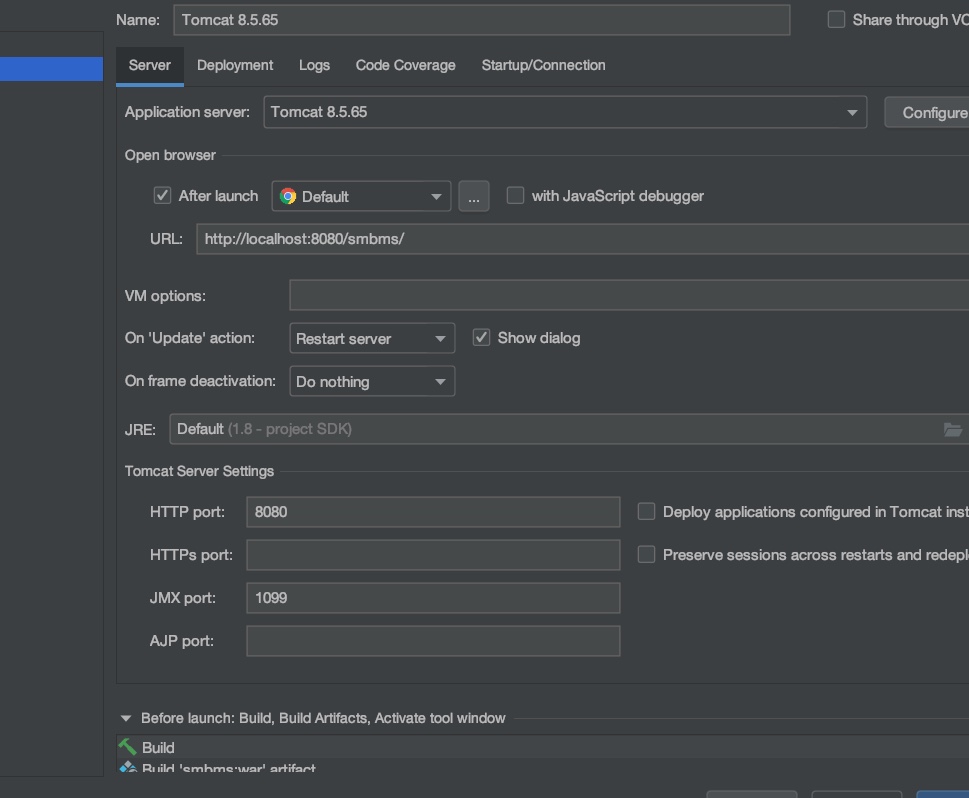
<body>
hello world,tomcat
</body>
第三步:测试项目是否能跑起来。自己加个helloworld
第四步:导入依赖
jsp,Servlet,mysqlconnect
<!--导入包-->
    <dependencies>
        <!--servlet-->
        <dependency>
            <groupId>javax.servlet</groupId>
            <artifactId>servlet-api</artifactId>
            <version>2.5</version>
        </dependency>
        <!--servlet-->
        <dependency>
            <groupId>javax.servlet.jsp</groupId>
            <artifactId>javax.servlet.jsp-api</artifactId>
            <version>2.3.3</version>
        </dependency>
        <!--mysql-->
        <dependency>
            <groupId>mysql</groupId>
            <artifactId>mysql-connector-java</artifactId>
            <version>5.1.47</version>
        </dependency>
        <!--jstl-->
        <dependency>
            <groupId>javax.servlet.jsp.jstl</groupId>
            <artifactId>jstl-api</artifactId>
            <version>1.2</version>
        </dependency>
        <!--standard-->
        <dependency>
            <groupId>taglibs</groupId>
            <artifactId>standard</artifactId>
            <version>1.1.2</version>
        </dependency>
    </dependencies>
<!--    在build中配置resources , 来防止我们资源导出失败的问题-->
    <build>
        <resources>
            <resource>
                <directory>src/main/resources</directory>
                <includes>
                    <include>**/*.properties</include>
                    <include>**/*.xml</include>
                </includes>
            </resource>
            <resource>
                <directory>src/main/java</directory>
                <includes>
                    <include>**/*.properties</include>
                    <include>**/*.xml</include>
                </includes>
            </resource>
        </resources>
    </build>
第五步:创建项目包,结构,MVC
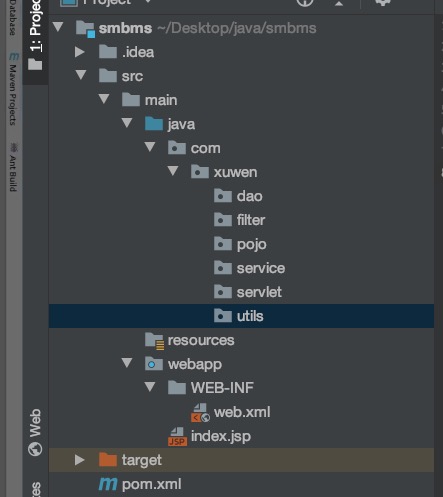
第六步:编写实体类
ORM映射,表--类--映射
第七步:编写基础公共类
db.properites
7.1数据库配置文件
7.2编写数据库,公共类,在不使用框架的情况下
package com.xuwen.dao;

import java.io.IOException;
import java.io.InputStream;
import java.sql.*;
import java.util.Properties;

/**
 * author:xuwen
 * Created on 2021/7/20
 */

//操作数据库的基本类
public class BaseDao {
    private static String driver;
    private static String url;
    private static String username;
    private static String password;

    //static静态代码块,类加载的时候,就初始化
    static{
        Properties properties = new Properties();
        //通过类加载器,读取对应的资源
        InputStream is = BaseDao.class.getClassLoader().getResourceAsStream("db.properties");
        try {
            properties.load(is);
        } catch (IOException e) {
            e.printStackTrace();
        }

        driver = properties.getProperty("driver");
        url = properties.getProperty("url");
        username = properties.getProperty("username");
        password = properties.getProperty("password");
    }

    //获得数据库连接
    public static Connection getConnection(){
        Connection connection = null;
        try {
            Class.forName(driver);
            connection = DriverManager.getConnection(url,username,password);
        } catch (Exception e) {
            e.printStackTrace();
        }
        return connection;
    }

    //编写查询公共类
    public static ResultSet execute(Connection connection, String sql, Object[] params,ResultSet resultSet,PreparedStatement preparedStatement) throws SQLException {
        //预编译的sql在后面执行,就可以了
        preparedStatement = connection.prepareStatement(sql);
        for (int i=0;i<params.length;i++){
            preparedStatement.setObject(i+1,params[i]);
        }
        resultSet = preparedStatement.executeQuery();
        return resultSet;
    }


    //编写增,删,改,公共类
    public static int execute(Connection connection, String sql, Object[] params,PreparedStatement preparedStatement) throws SQLException {
        preparedStatement = connection.prepareStatement(sql);
        for (int i=0;i<params.length;i++){
            preparedStatement.setObject(i+1,params[i]);
        }
        int updateRows = preparedStatement.executeUpdate();
        return updateRows;
    }

    //释放连接
    public static boolean closeResource(Connection connection, PreparedStatement preparedStatement, ResultSet resultSet){
        boolean flag = true;
        if(resultSet != null){
            try {
                resultSet.close();
                //GC回收
                resultSet = null;
            } catch (SQLException e) {
                e.printStackTrace();
                flag = false;
            }
        }
        if(connection != null){
            try {
                connection.close();
                //GC回收
                connection = null;
            } catch (SQLException e) {
                e.printStackTrace();
                flag = false;
            }
        }
        if(preparedStatement != null){
            try {
                preparedStatement.close();
                //GC回收
                preparedStatement = null;
            } catch (SQLException e) {
                e.printStackTrace();
                flag = false;
            }
        }
        return flag;

    }

}
7.3过滤器filter,注意不要倒错Filter的包
package com.xuwen.filter;

import javax.servlet.*;
import java.io.IOException;
import java.util.logging.LogRecord;

/**
 * author:xuwen
 * Created on 2021/7/20
 */
public class CharacterEncodingFilter implements Filter {

    public void init(FilterConfig filterConfig) throws ServletException {

    }

    public void doFilter(ServletRequest servletRequest, ServletResponse servletResponse, FilterChain filterChain) throws IOException, ServletException {
        servletRequest.setCharacterEncoding("utf-8");
        servletResponse.setCharacterEncoding("utf-8");
        filterChain.doFilter(servletRequest,servletResponse);
    }

    public void destroy() {

    }
}
7.4 xml
    <!--字符编码过滤器-->
    <filter>
        <filter-name>CharacterEncodingFilter</filter-name>
        <filter-class>com.xuwen.filter.CharacterEncodingFilter</filter-class>
    </filter>
    <filter-mapping>
        <filter-name>CharacterEncodingFilter</filter-name>
        <url-pattern>/*</url-pattern>
    </filter-mapping>