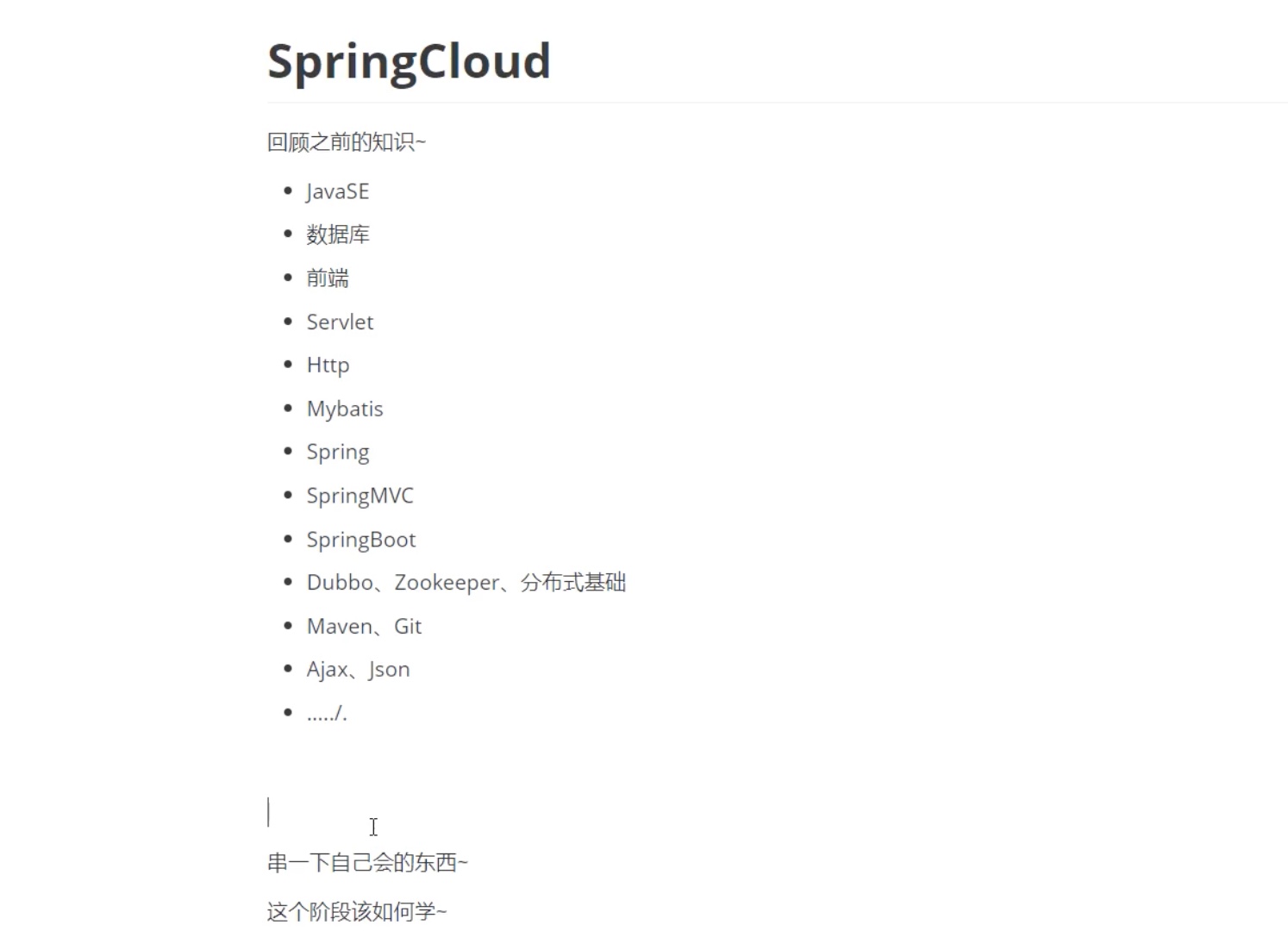
这个阶段改如何学???
三层框架:mvc
框架:spring IOC AOP
springboot自动装配,约定》配置
springcloud 拆分,all in one->变成模块化
springcloud,通信!!微服务架构
四个核心
1服务很多,客户端如何访问
2服务很多,服务之间如何通信
3服务很多,如何治理,
4服务挂了,怎么办
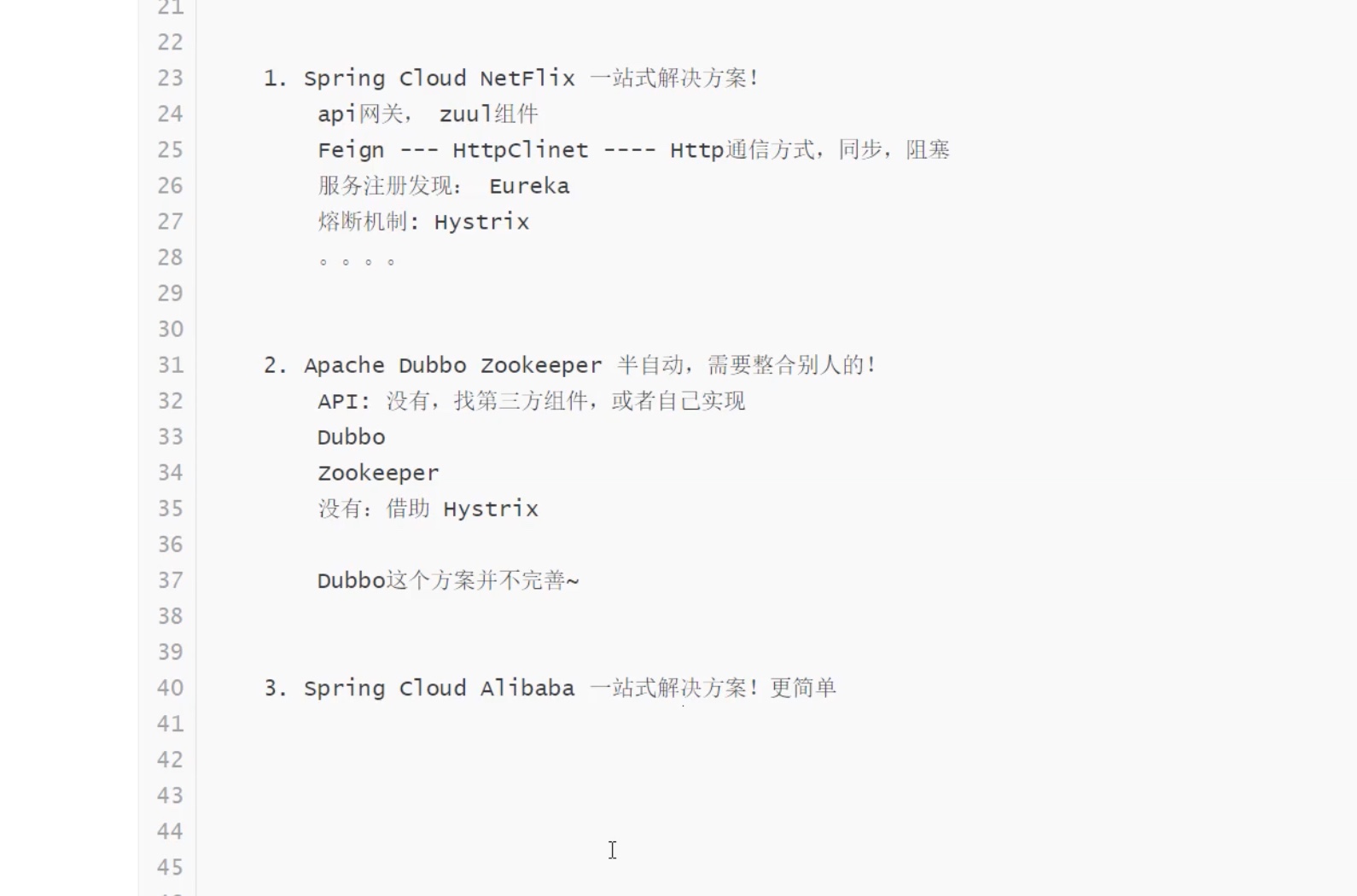
@SpringBootApplication(exclude = {org.springframework.boot.autoconfigure.security.servlet.SecurityAutoConfiguration.class})
概述: @SpringBootApplication = (默认属性)@Configuration + @EnableAutoConfiguration + @ComponentScan ,@ComponentScan basePackages,includeFilters,excludeFilters属性来动态确定自动扫描范围,类型已经不扫描的类型,默认情况下:它扫描所有类型,并且扫描范围是 @ComponentScan 注解所在配置类包及子包的类。
参考:https://www.cnblogs.com/MaxElephant/p/8108140.html ; https://www.jianshu.com/p/39ee4f98575c

@EnableEurekaClient
概述: 如果选用的注册中心是eureka,那么就推荐@EnableEurekaClient,如果是其他的注册中心,那么推荐使用@EnableDiscoveryClient。
参考:https://www.jianshu.com/p/f6db3117864f

@FeignClient(name = "bigdataservice")
概述:FeignClient简化了请求的编写,且通过动态负载进行选择要使用哪个服务进行消费,而这一切都由Spring动态配置实现,我们不用关心这些,只管使用方法即可。再说,就是简化了编写,RestTemplate还需要写上服务器IP这些信息等等,而FeignClient则不用。
参考:https://blog.csdn.net/github_39577257/article/details/81842234 ; https://blog.csdn.net/ZYC88888/article/details/81291684

@RestController
概述:相当于@Controller+@ResponseBody两个注解的结合,返回json数据不需要在方法前面加@ResponseBody注解了,但使用@RestController这个注解,就不能返回jsp,html页面,视图解析器无法解析jsp,html页面。
参考:https://www.cnblogs.com/shuaifing/p/8119664.html ; https://blog.csdn.net/qq_41063141/article/details/81805082

@RequestMapping("/fei")
概述:@RequestMapping请求路径映射,如果标注在某个controller的类级别上,则表明访问此类路径下的方法都要加上其配置的路径;最常用是标注在方法上,表明哪个具体的方法来接受处理某次请求。
参考:https://blog.csdn.net/yiye2017zhangmu/article/details/80500932 ; https://blog.csdn.net/jeofey/article/details/76019953 ; https://www.oschina.net/translate/using-the-spring-requestmapping-annotation

@GetMapping("/cf")
概述:@GetMapping是一个组合注解,是@RequestMapping(method = RequestMethod.GET)的缩写,该注解将 HTTP Get 映射到特定的处理方法上。
参考:https://www.cnblogs.com/niexinlei/p/9704075.html ; https://blog.csdn.net/weixin_38553453/article/details/73692863

@Getter
注解在类上, 为类提供读写属性
参考:https://blog.csdn.net/qq_37433657/article/details/83275051
@Setter
注解在类上, 为类提供读写属性
参考:https://blog.csdn.net/qq_37433657/article/details/83275051
@ToString
注解在类上,为类提供toString()方法
参考:https://blog.csdn.net/qq_37433657/article/details/83275051
@ExcelTitle("资产编号")
@Documented //文档
@Retention(RetentionPolicy.RUNTIME) //在运行时可以获取
作用:表示需要在什么级别保存该注释信息,用于描述注解的生命周期(即:被描述的注解在什么范围内有效);取值(RetentionPoicy)有:1.SOURCE:在源文件中有效(即源文件保留)2.CLASS:在class文件中有效(即class保留)3.RUNTIME:在运行时有效(即运行时保留)
参考:https://www.cnblogs.com/unknows/p/10261667.html

@Target({ ElementType.TYPE, ElementType.FIELD}) //作用到类,方法,接口上等
@Inherited //子类会继承
@Data
注解在类上,为类提供读写属性, 此外还提供了equals()、hashCode()、toString()方法
参考:https://blog.csdn.net/qq_37433657/article/details/83275051
@Resource
默认按名称装配,当找不到与名称匹配的bean才会按类型装配
参考:https://blog.csdn.net/qq_16055765/article/details/78833260
@Component
泛指组件,当组件不好归类的时候,我们可以使用这个注解进行标注
参考:https://blog.csdn.net/qq_16055765/article/details/78833260
@Validated
用在类型、方法和方法参数上。但不能用于成员属性(field)
参考:https://blog.csdn.net/weixin_38118016/article/details/80977207 ; https://blog.csdn.net/herojuice/article/details/86020101

@Valid
用于验证注解是否符合要求,可以用在方法、构造函数、方法参数和成员属性(field)上
参考:https://blog.csdn.net/weixin_38118016/article/details/80977207 ; https://blog.csdn.net/herojuice/article/details/86020101
@EnableFeignClients
启用feign客户端

@EnableRedisHttpSession

@Bean
带有@Configuration的注解类表示这个类可以使用Spring IoC容器作为bean定义的来源。@Bean注解告诉Spring,一个带有@Bean的注解方法将返回一个对象,该对象应该被注册为在Spring应用程序上下文中的bean。
参考:https://www.cnblogs.com/microcat/p/7074720.html
@Primary
自动装配时当出现多个Bean候选者时,被注解为@Primary的Bean将作为首选者,否则将抛出异常
参考:https://blog.csdn.net/qq_16055765/article/details/78833260
@ConditionalOnMissingBean(ObjectMapper.class)
@Service
@Service用于标注业务层组件,@Controller用于标注控制层组件(如struts中的action),@Repository用于标注数据访问组件,即DAO组件,而@Component泛指组件,当组件不好归类的时候,我们可以使用这个注解进行标注。
@Autowired
可以对类成员变量、方法及构造函数进行标注,完成自动装配的工作。通过@Autowired的使用来消除set,get方法。

@Override
在重写父类的onCreate时,在方法前面加上@Override系统可以帮你检查方法的正确性。

@Repository
@Service用于标注业务层组件,@Controller用于标注控制层组件(如struts中的action),@Repository用于标注数据访问组件,即DAO组件,而@Component泛指组件,当组件不好归类的时候,我们可以使用这个注解进行标注。

@Query(value = "AVG(cost) cost,SUM(totla_original_value) original,AVG(aera) aeara,STATISTICS_MONTH month from stat_finance where STATISTICS_YEAR=?1 and department=?2 group by STATISTICS_MONTH", nativeQuery = true)
为了简化Dao的代码,使用了JPA来写Dao,Dao的接口方法上使用@Query注释,不需要再写一个实现类(Impl)。

带有 @Configuration 的注解类表示这个类可以使用 Spring IoC 容器作为 bean 定义的来源。@Bean 注解告诉 Spring,一个带有 @Bean 的注解方法将返回一个对象,该对象应该被注册为在 Spring 应用程序上下文中的 bean。
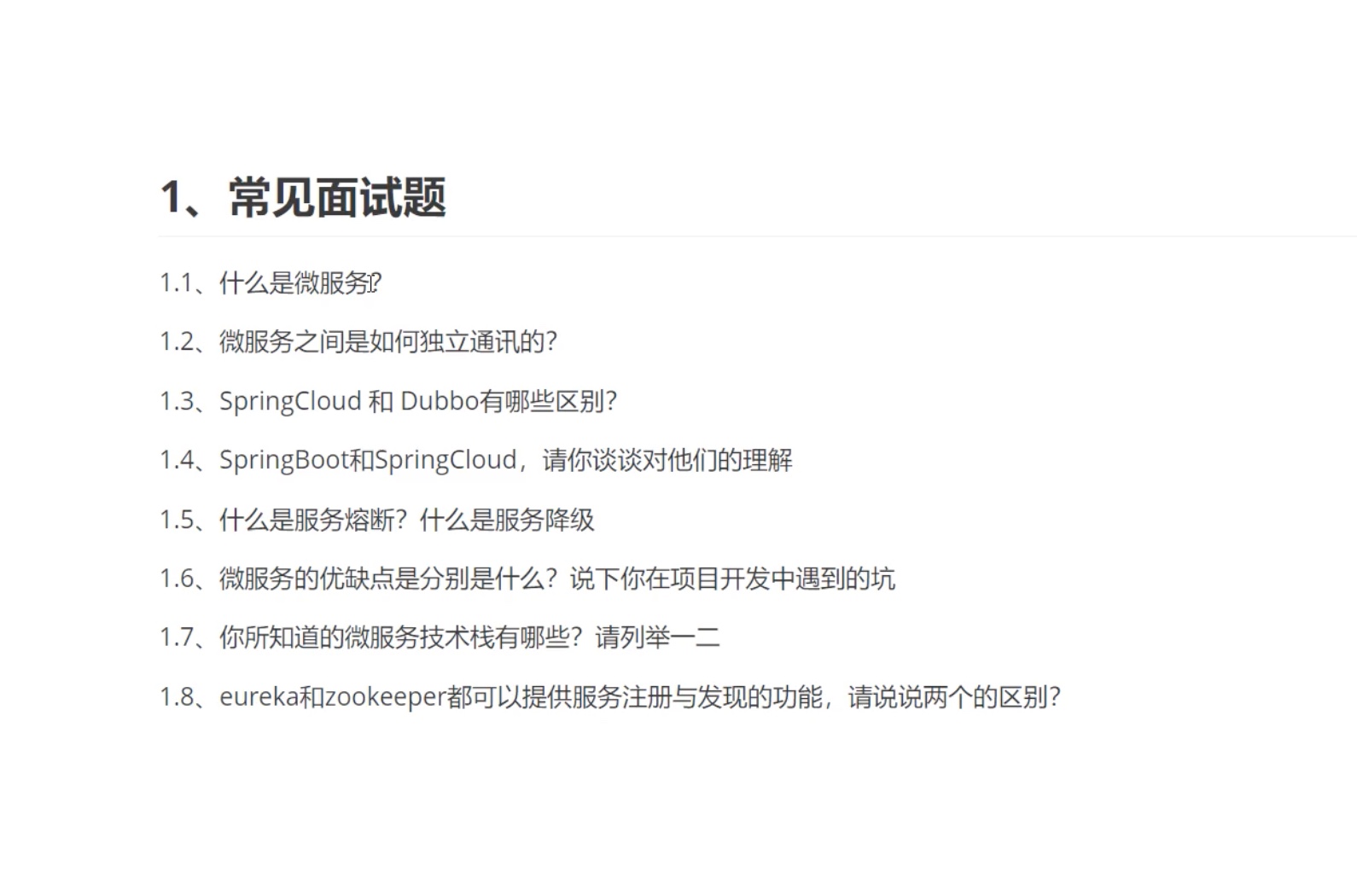
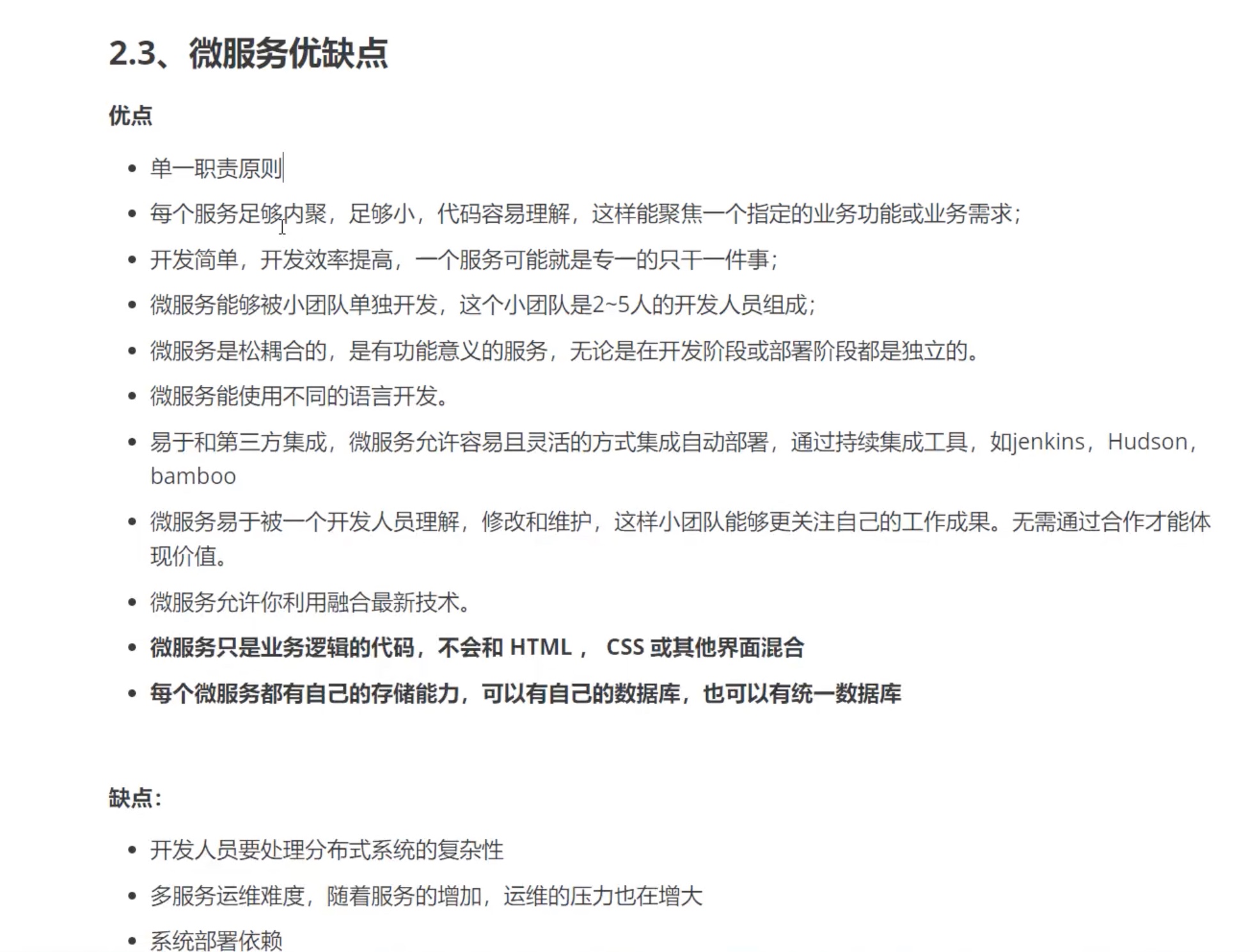
微服务的优缺点???
微服务技术栈
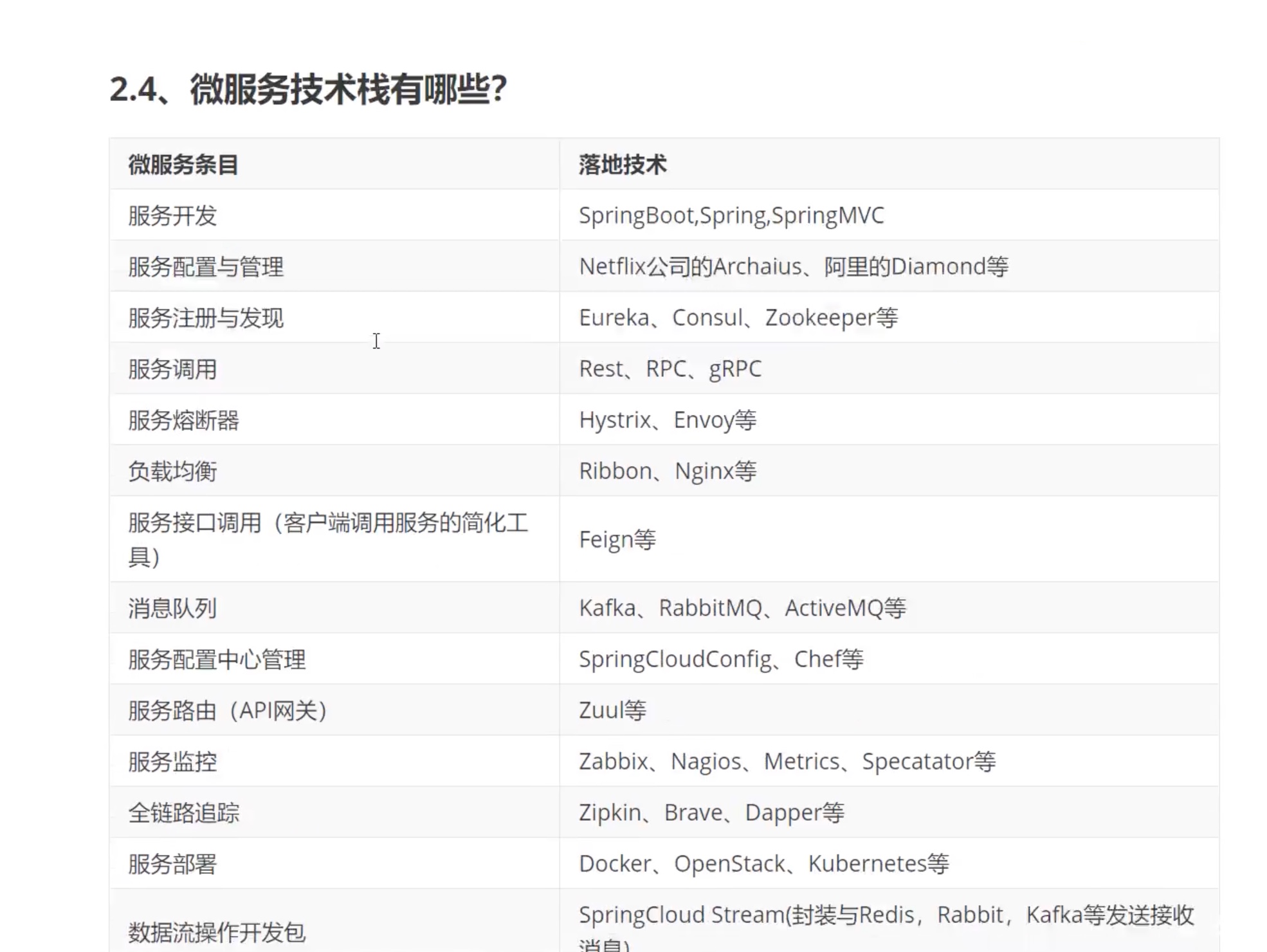
事件消息总线:SpringCloudBus
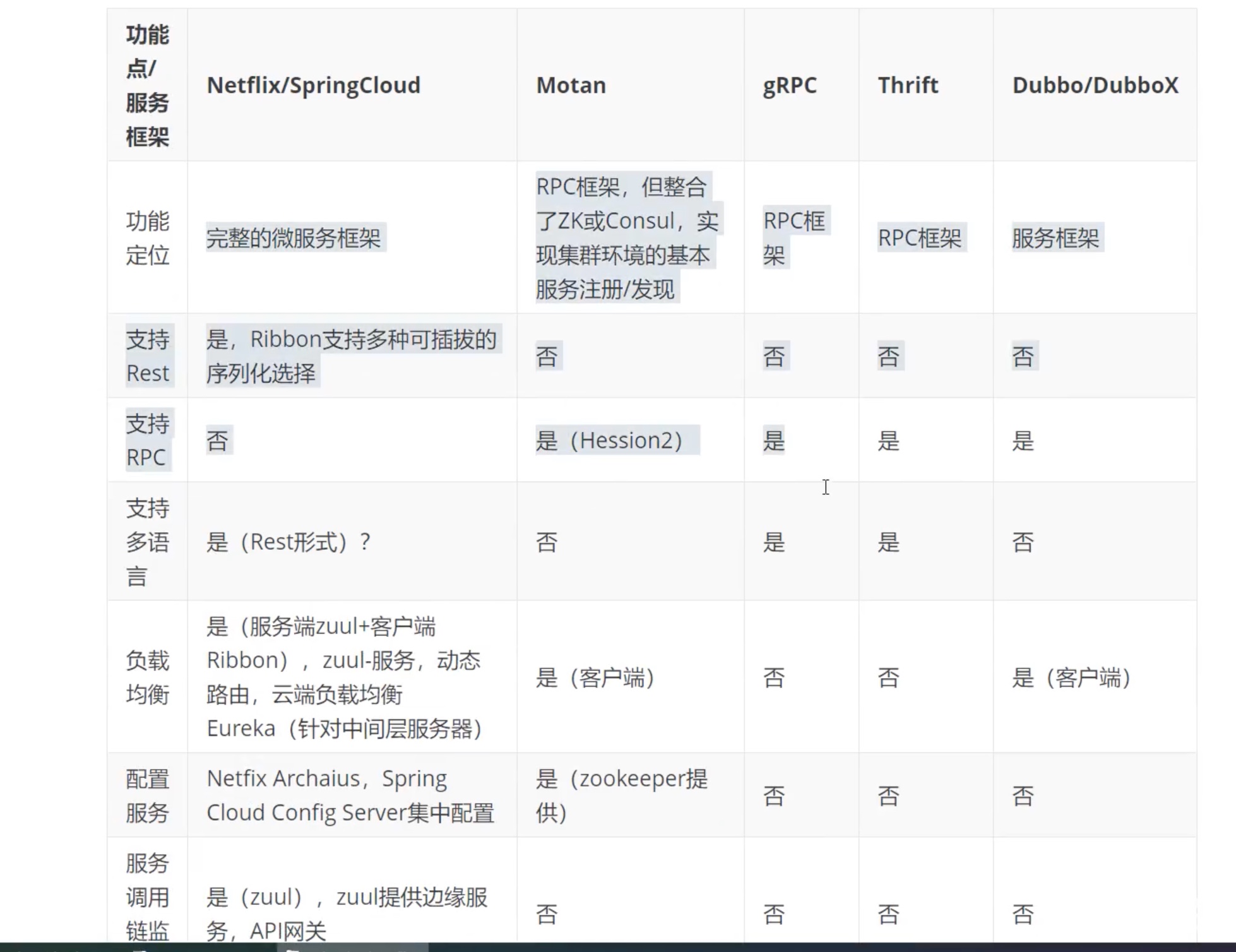
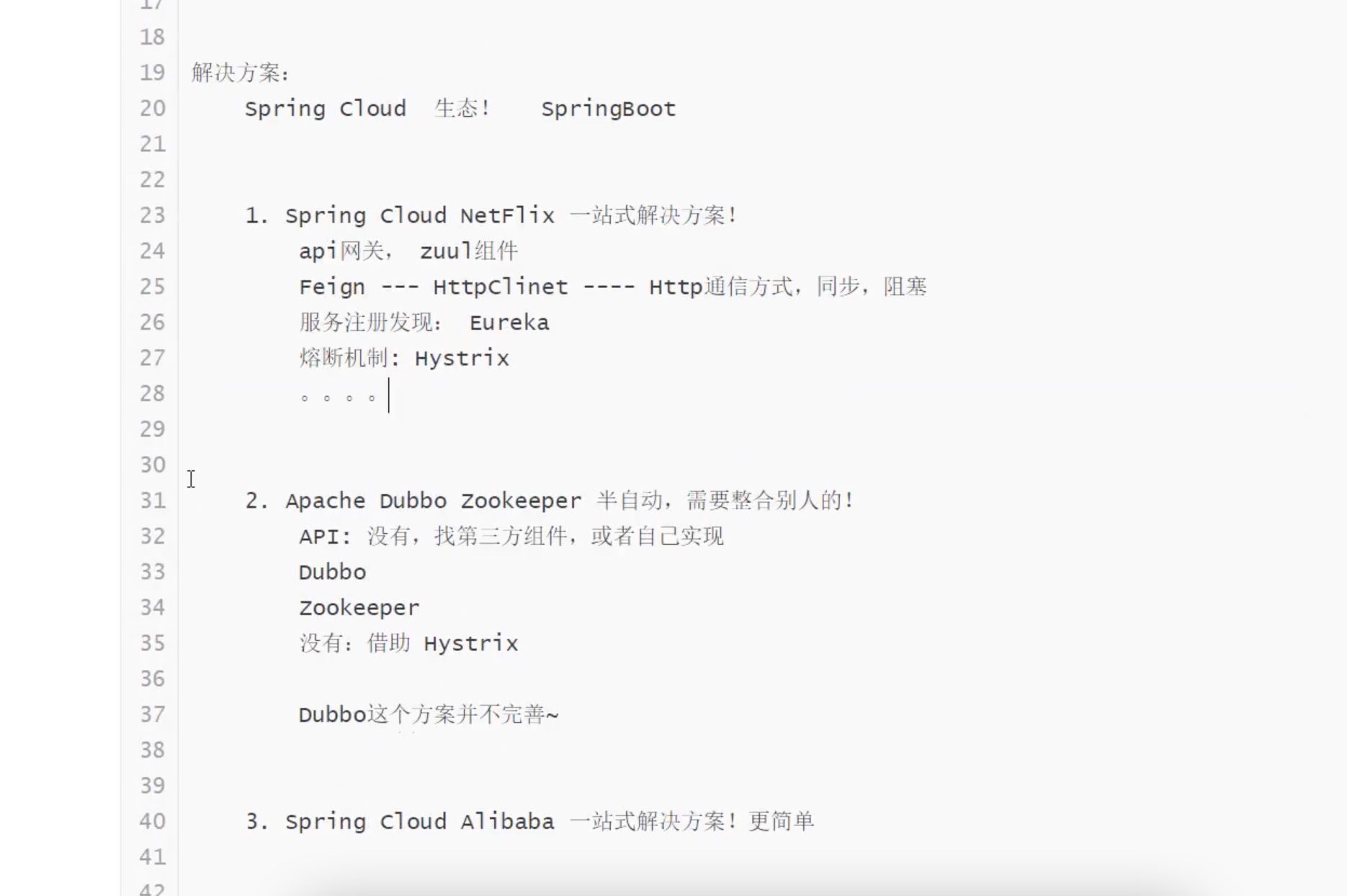
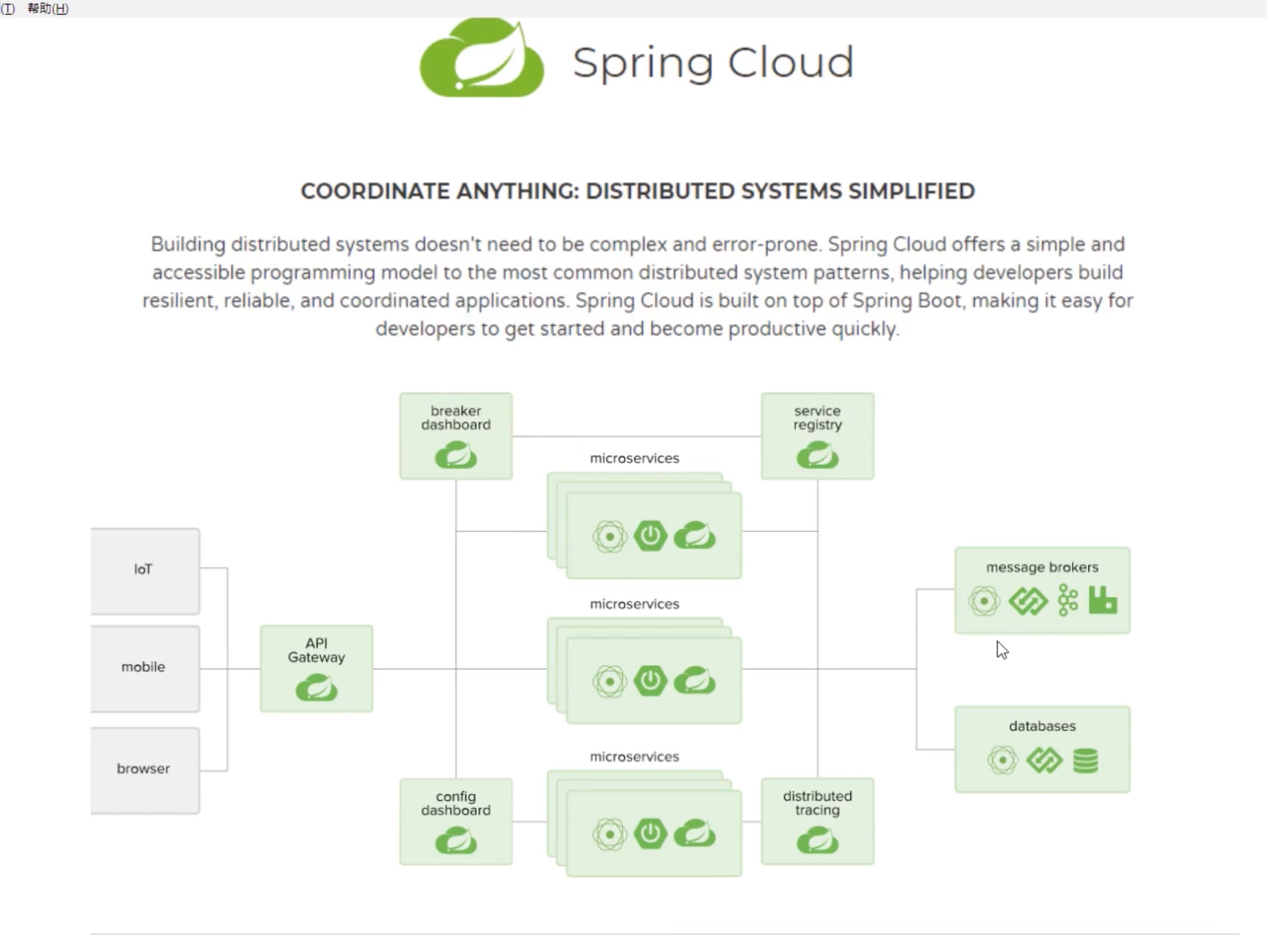
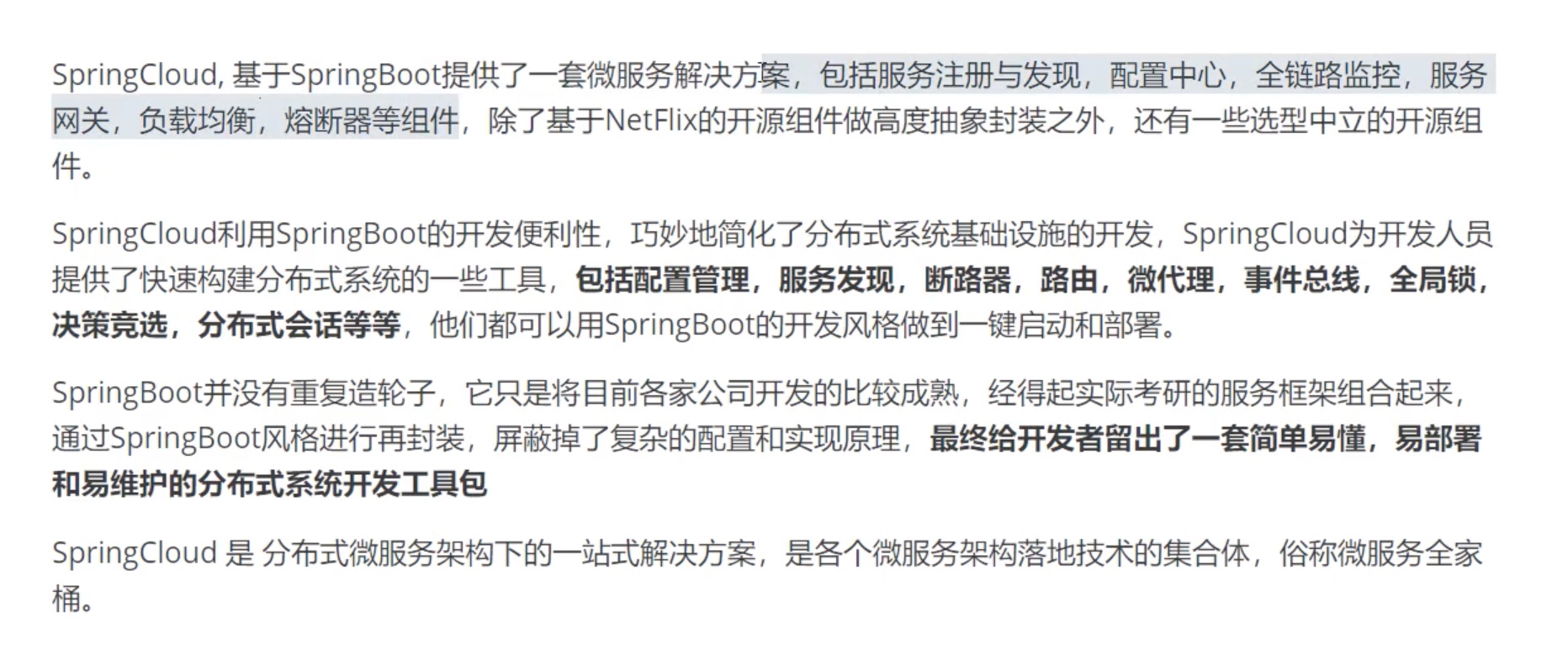
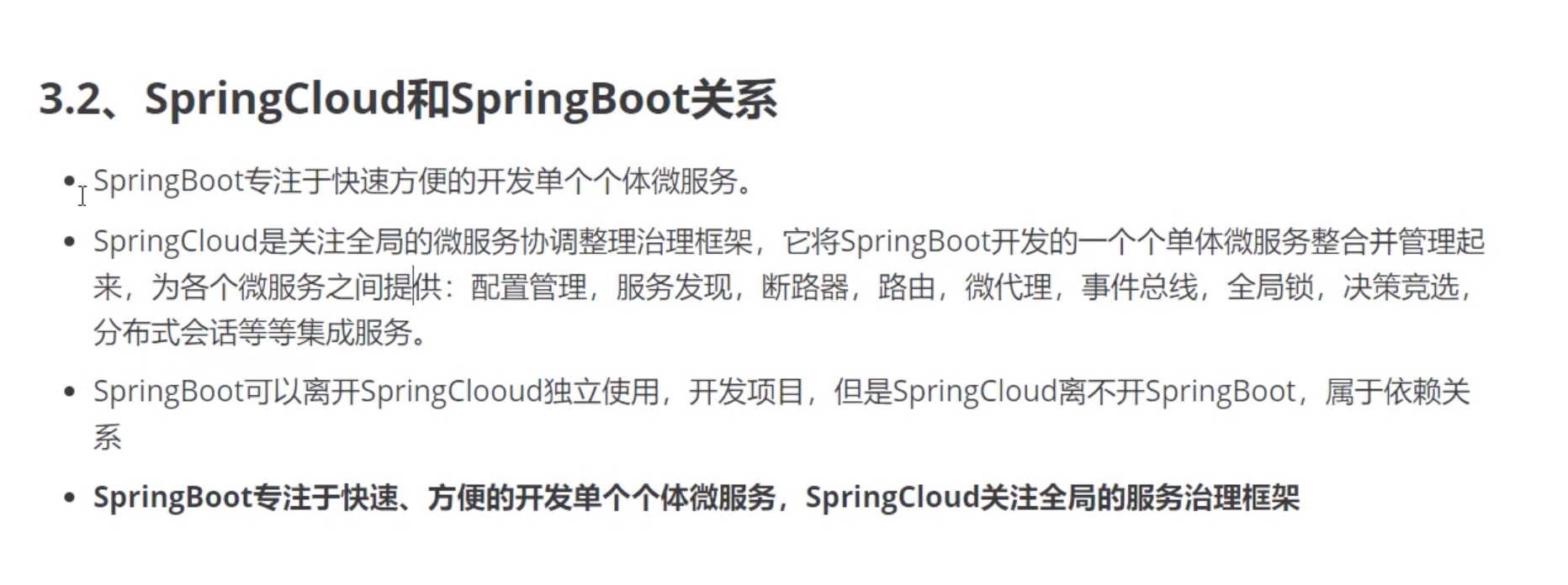
分布式+传统网站Dubbo
目前成熟的互联网架构,应用拆分+消息中间件: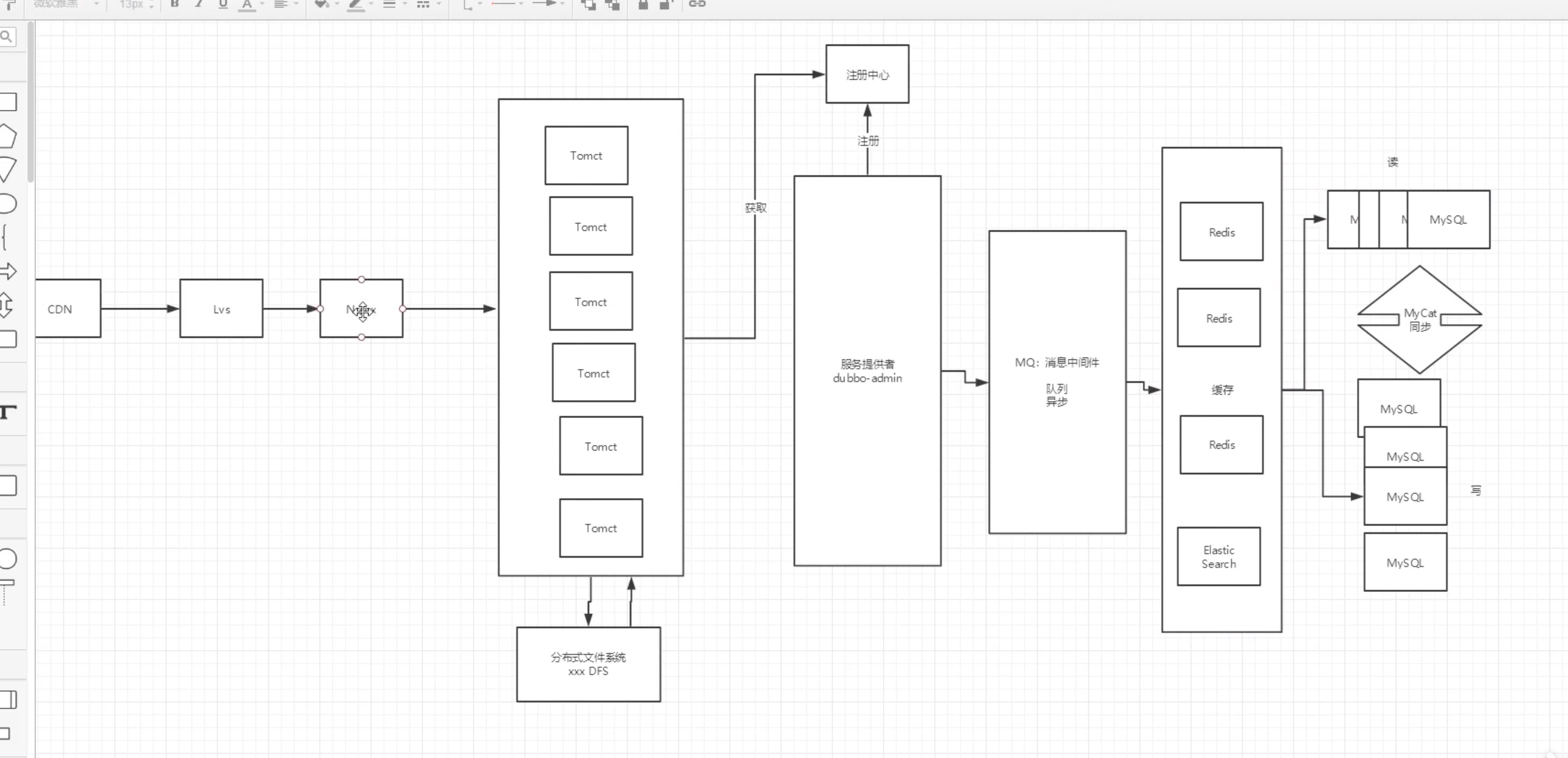
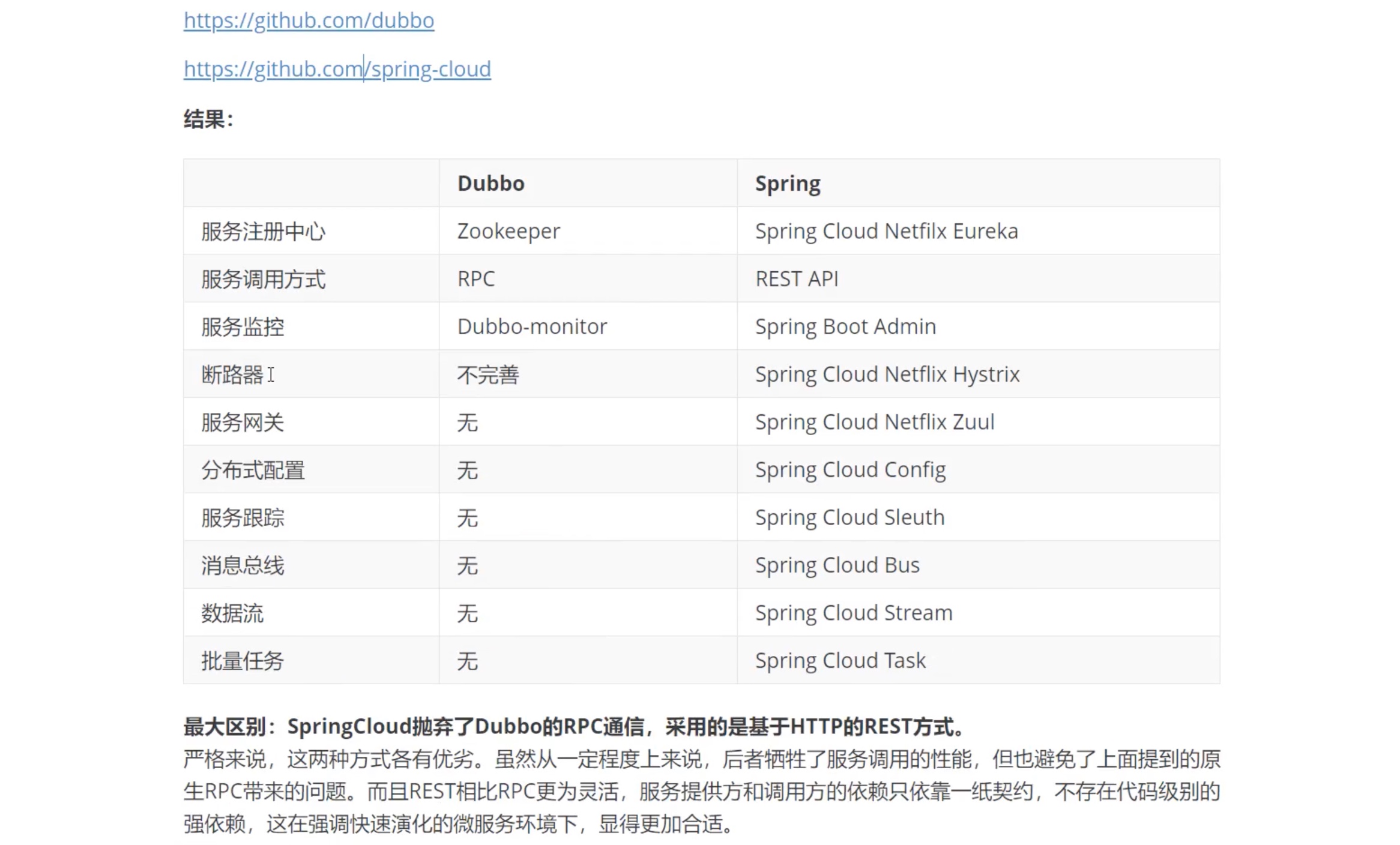
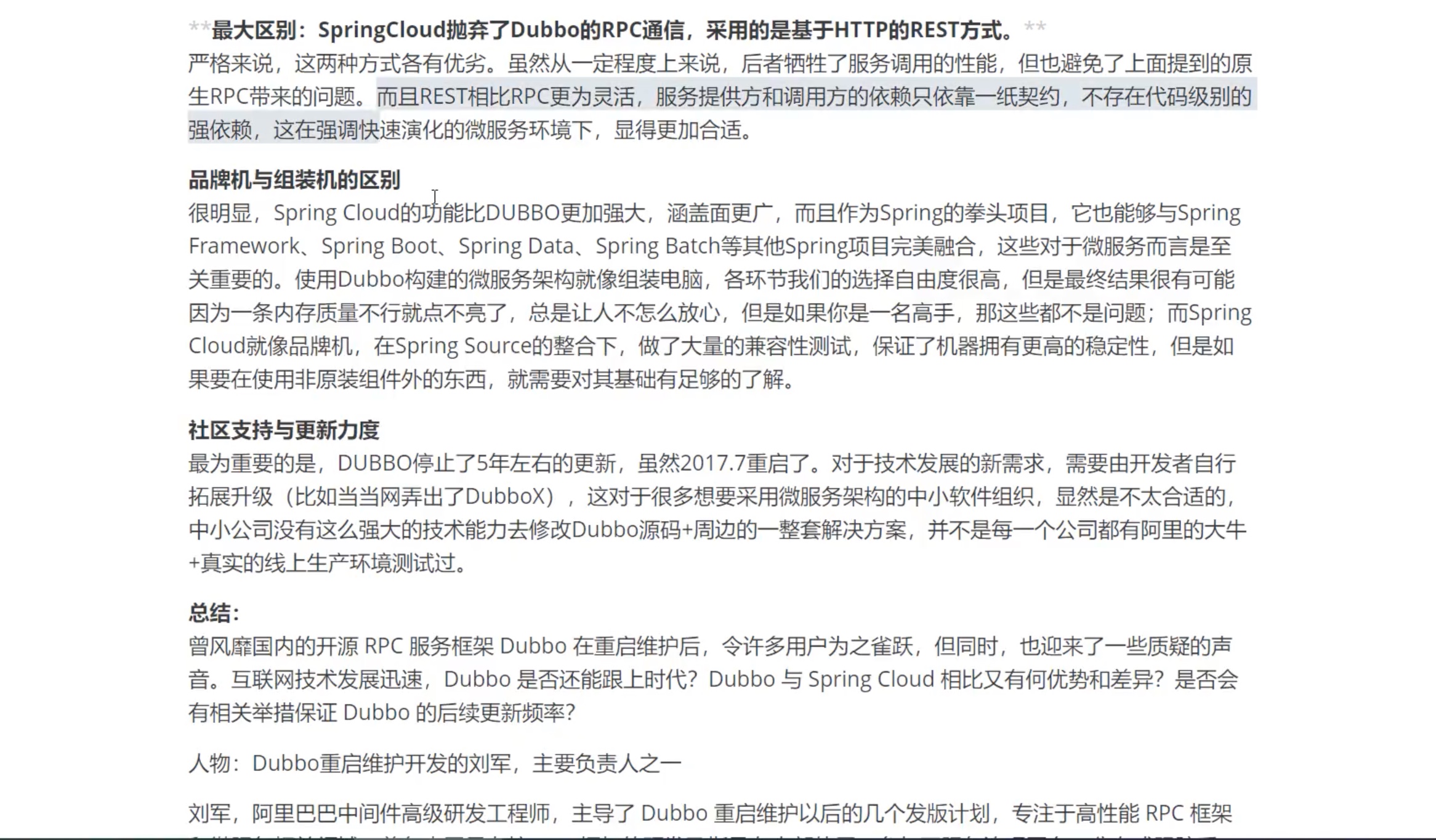
springcloud中文api文档--》link
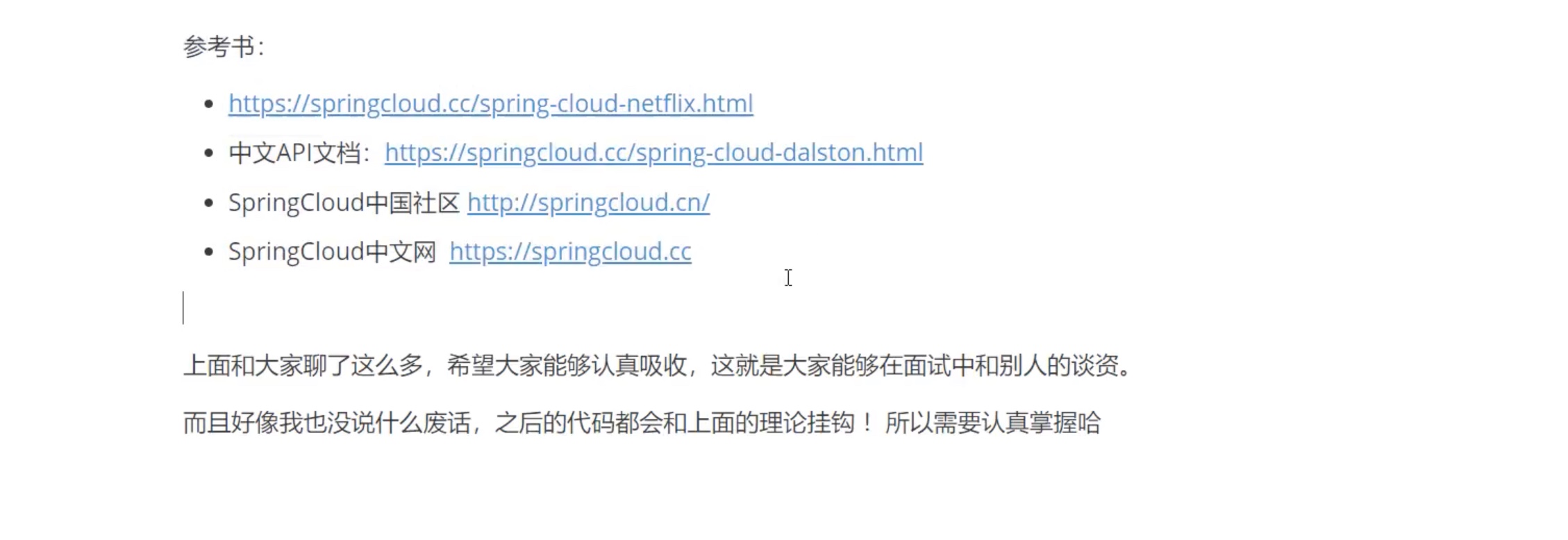
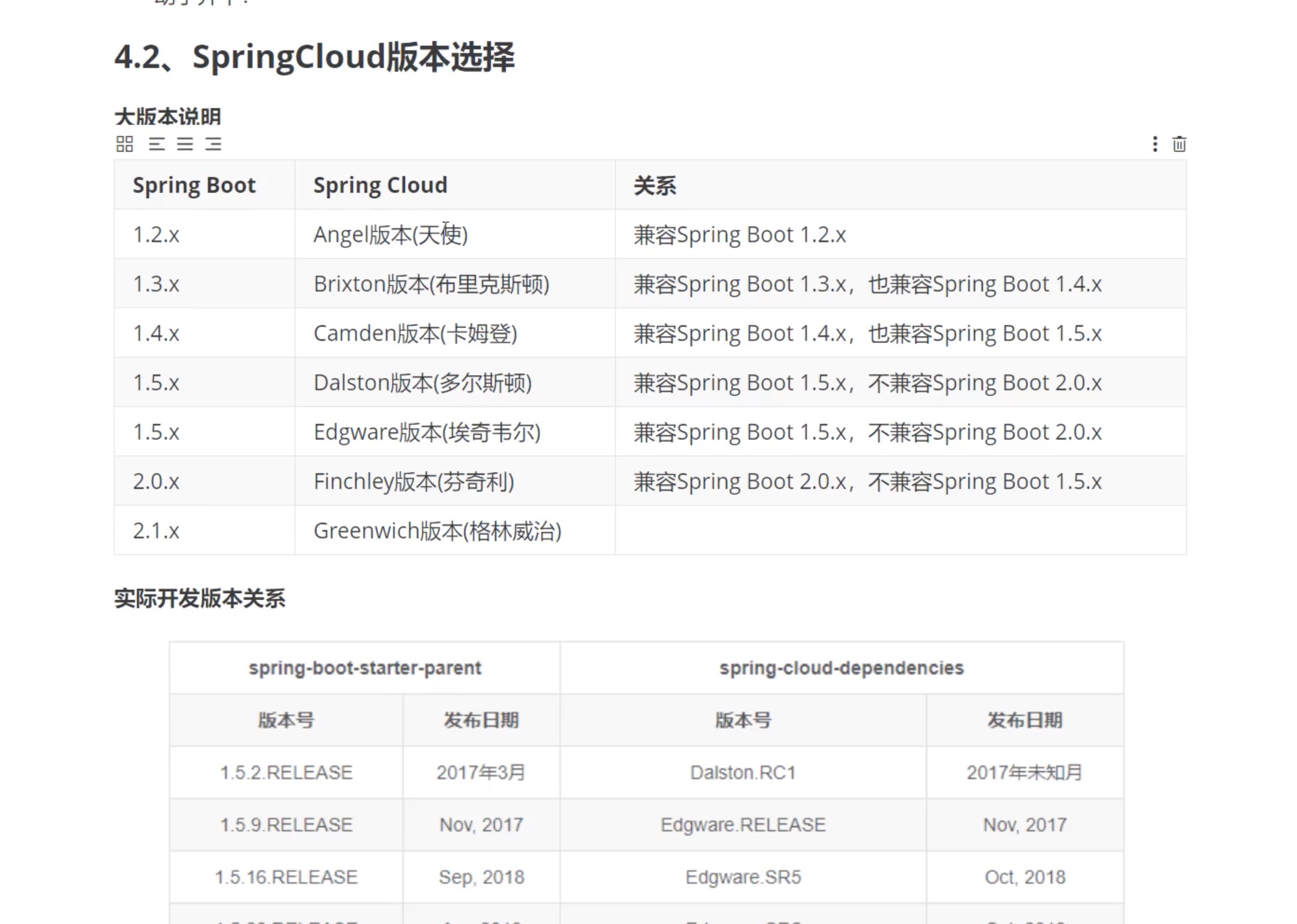
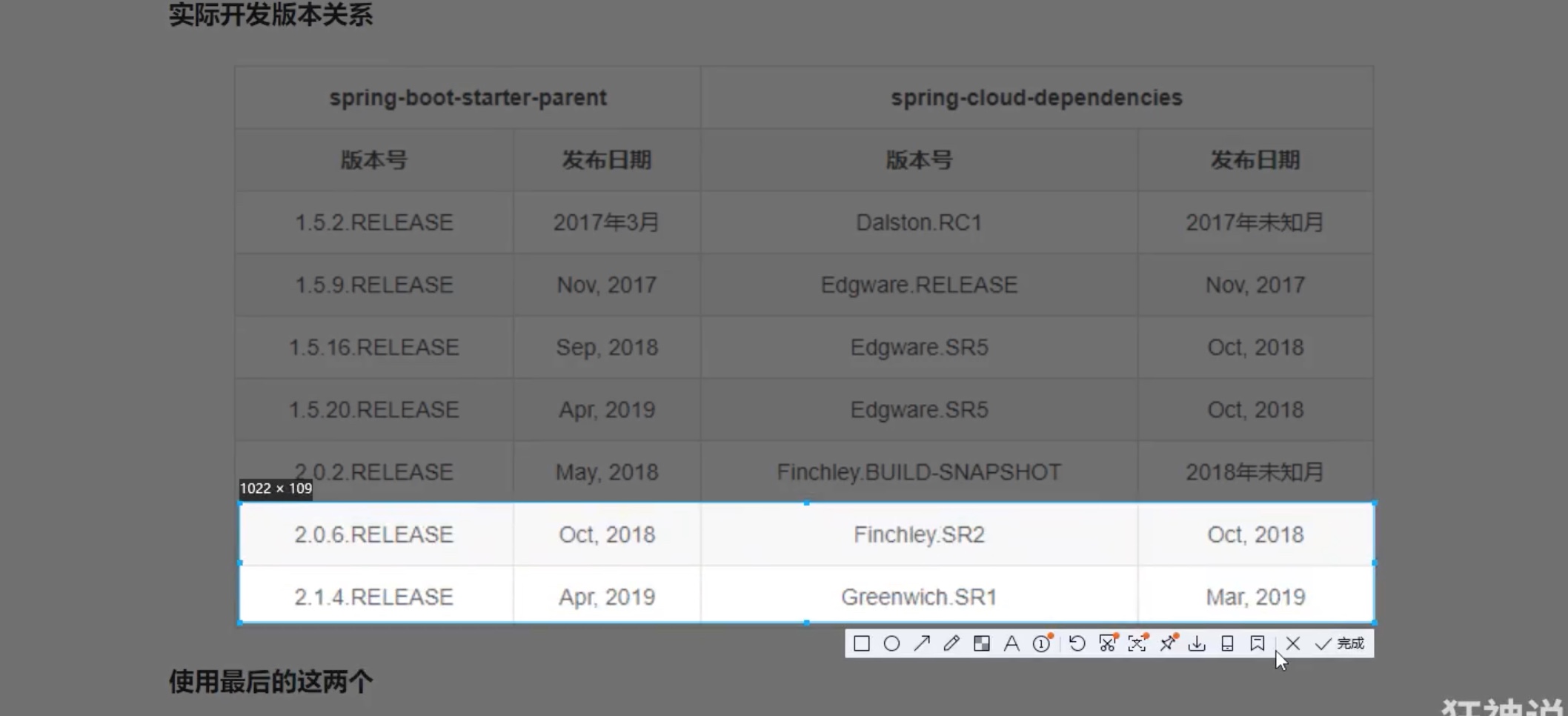
创建一个maven项目
maven仓库地址:link
<?xml version="1.0" encoding="UTF-8"?>
<project xmlns="http://maven.apache.org/POM/4.0.0"
         xmlns:xsi="http://www.w3.org/2001/XMLSchema-instance"
         xsi:schemaLocation="http://maven.apache.org/POM/4.0.0 http://maven.apache.org/xsd/maven-4.0.0.xsd">
    <modelVersion>4.0.0</modelVersion>

    <groupId>com.xuwen</groupId>
    <artifactId>springcloud</artifactId>
    <version>1.0-SNAPSHOT</version>
    <modules>
        <module>springcloud-api</module>
        <module>springcloud-provider-dept-8001</module>
        <module>springcloud-consumer-80</module>
    </modules>
    <!--打包方式,pom-->
    <packaging>pom</packaging>
    <!--版本号,父项目-->
    <properties>
        <junit.version>4.12</junit.version>
        <lombok.version>1.16.10</lombok.version>
        <log4j.version>1.2.17</log4j.version>
        <project.build.sourceEncoding>UTF-8</project.build.sourceEncoding>
        <maven.compiler.source>1.8</maven.compiler.source>
        <maven.compiler.target>1.8</maven.compiler.target>
    </properties>
    <!--DM,父项目-->
    <dependencyManagement>
        <dependencies>
            <!--springcloud,依赖Greenwich版本-->
            <dependency>
                <groupId>org.springframework.cloud</groupId>
                <artifactId>spring-cloud-dependencies</artifactId>
                <version>Greenwich.SR1</version>
                <type>pom</type>
                <scope>import</scope>
            </dependency>
            <!--springboot-->
            <dependency>
                <groupId>org.springframework.boot</groupId>
                <artifactId>spring-boot-dependencies</artifactId>
                <version>2.1.4.RELEASE</version>
                <type>pom</type>
                <scope>import</scope>
            </dependency>
            <!--数据库-->
            <dependency>
                <groupId>mysql</groupId>
                <artifactId>mysql-connector-java</artifactId>
                <version>5.1.47</version>
            </dependency>
            <!--数据源-->
            <dependency>
                <groupId>org.springframework</groupId>
                <artifactId>spring-jdbc</artifactId>
            </dependency>
            <dependency>
                <groupId>com.alibaba</groupId>
                <artifactId>druid</artifactId>
                <version>1.1.10</version>
            </dependency>
            <!--启动器springBootStarter-->
            <dependency>
                <groupId>org.mybatis.spring.boot</groupId>
                <artifactId>mybatis-spring-boot-starter</artifactId>
                <version>2.1.3</version>
            </dependency>
            <!--日志与测试-->
            <!--junit-->
            <dependency>
                <groupId>junit</groupId>
                <artifactId>junit</artifactId>
                <version>${junit.version}</version>
            </dependency>
            <!--lombok-->
            <dependency>
                <groupId>org.projectlombok</groupId>
                <artifactId>lombok</artifactId>
                <version>${lombok.version}</version>
            </dependency>
            <!--log4j-->
            <dependency>
                <groupId>log4j</groupId>
                <artifactId>log4j</artifactId>
                <version>${log4j.version}</version>
            </dependency>
            <!--logback-->
            <dependency>
                <groupId>ch.qos.logback</groupId>
                <artifactId>logback-core</artifactId>
                <version>1.2.3</version>
            </dependency>
            <!--其他-->
        </dependencies>
    </dependencyManagement>
    <!--    在build中配置resources , 来防止我们资源导出失败的问题-->
<!--    <build>-->
<!--        <resources>-->
<!--            <resource>-->
<!--                <directory>src/main/resources</directory>-->
<!--                <includes>-->
<!--                    <include>**/*.properties</include>-->
<!--                    <include>**/*.xml</include>-->
<!--                </includes>-->
<!--            </resource>-->
<!--            <resource>-->
<!--                <directory>src/main/java</directory>-->
<!--                <includes>-->
<!--                    <include>**/*.properties</include>-->
<!--                    <include>**/*.xml</include>-->
<!--                </includes>-->
<!--            </resource>-->
<!--        </resources>-->
<!--    </build>-->


</project>
第一课:
springcloud-api
springcloud--provider提供者的依赖包
<?xml version="1.0" encoding="UTF-8"?>
<project xmlns="http://maven.apache.org/POM/4.0.0"
         xmlns:xsi="http://www.w3.org/2001/XMLSchema-instance"
         xsi:schemaLocation="http://maven.apache.org/POM/4.0.0 http://maven.apache.org/xsd/maven-4.0.0.xsd">
    <parent>
        <artifactId>springcloud</artifactId>
        <groupId>com.xuwen</groupId>
        <version>1.0-SNAPSHOT</version>
    </parent>
    <modelVersion>4.0.0</modelVersion>

    <artifactId>springcloud-provider-dept-8001</artifactId>
    <dependencies>
        <!--我们需要拿到实体类,所以需要配置api的module,点的过去就ok,连上了-->
        <!--服务拆分-->
        <dependency>
            <groupId>com.xuwen</groupId>
            <artifactId>springcloud-api-01</artifactId>
            <version>1.0-SNAPSHOT</version>
        </dependency>
        <!--父依赖里面的单元测试,无需版本号-->
        <dependency>
            <groupId>junit</groupId>
            <artifactId>junit</artifactId>
        </dependency>
        <dependency>
            <groupId>mysql</groupId>
            <artifactId>mysql-connector-java</artifactId>
        </dependency>
        <dependency>
            <groupId>com.alibaba</groupId>
            <artifactId>druid</artifactId>
        </dependency>
        <dependency>
            <groupId>ch.qos.logback</groupId>
            <artifactId>logback-core</artifactId>
        </dependency>
        <dependency>
            <groupId>org.mybatis.spring.boot</groupId>
            <artifactId>mybatis-spring-boot-starter</artifactId>
        </dependency>
        <!--test-->
        <dependency>
            <groupId>org.springframework.boot</groupId>
            <artifactId>spring-boot-test</artifactId>
        </dependency>
        <!--springboot-web-->
        <dependency>
            <groupId>org.springframework.boot</groupId>
            <artifactId>spring-boot-starter-web</artifactId>
        </dependency>
        <!--jetty-->
        <dependency>
            <groupId>org.springframework.boot</groupId>
            <artifactId>spring-boot-starter-jetty</artifactId>
        </dependency>
        <!--热部署-->
        <dependency>
            <groupId>org.springframework.boot</groupId>
            <artifactId>spring-boot-devtools</artifactId>
        </dependency>
    </dependencies>


</project>
第2课:
springcloud-provider-8001
<?xml version="1.0" encoding="UTF-8"?>
<project xmlns="http://maven.apache.org/POM/4.0.0"
         xmlns:xsi="http://www.w3.org/2001/XMLSchema-instance"
         xsi:schemaLocation="http://maven.apache.org/POM/4.0.0 http://maven.apache.org/xsd/maven-4.0.0.xsd">
    <parent>
        <artifactId>springcloud</artifactId>
        <groupId>com.xuwen</groupId>
        <version>1.0-SNAPSHOT</version>
    </parent>
    <modelVersion>4.0.0</modelVersion>

    <artifactId>springcloud-provider-dept-8001</artifactId>
    <dependencies>
        <dependency>
            <groupId>org.springframework.cloud</groupId>
            <artifactId>spring-cloud-context</artifactId>
        </dependency>
        <!--我们需要拿到实体类,所以需要配置api的module,点的过去就ok,连上了-->
        <!--自己写的类-->
        <dependency>
            <groupId>com.xuwen</groupId>
            <artifactId>springcloud-api</artifactId>
            <version>1.0-SNAPSHOT</version>
        </dependency>
        <!--父依赖里面的单元测试,无需版本号-->
        <dependency>
            <groupId>junit</groupId>
            <artifactId>junit</artifactId>
        </dependency>
        <dependency>
            <groupId>mysql</groupId>
            <artifactId>mysql-connector-java</artifactId>
        </dependency>
        <dependency>
            <groupId>com.alibaba</groupId>
            <artifactId>druid</artifactId>
        </dependency>
        <dependency>
            <groupId>ch.qos.logback</groupId>
            <artifactId>logback-core</artifactId>
        </dependency>
        <dependency>
            <groupId>org.mybatis.spring.boot</groupId>
            <artifactId>mybatis-spring-boot-starter</artifactId>
        </dependency>
        <!--test-->
        <dependency>
            <groupId>org.springframework.boot</groupId>
            <artifactId>spring-boot-test</artifactId>
        </dependency>
        <!--springboot-web-->
        <dependency>
            <groupId>org.springframework.boot</groupId>
            <artifactId>spring-boot-starter-web</artifactId>
        </dependency>
        <!--jetty-->
        <dependency>
            <groupId>org.springframework.boot</groupId>
            <artifactId>spring-boot-starter-jetty</artifactId>
        </dependency>
        <!--热部署-->
        <dependency>
            <groupId>org.springframework.boot</groupId>
            <artifactId>spring-boot-devtools</artifactId>
        </dependency>
    </dependencies>

    <!--    在build中配置resources , 来防止我们资源导出失败的问题-->
    <build>
        <resources>
            <resource>
                <directory>src/main/java</directory>
                <includes>
                    <include>**/*.yml</include>
                    <include>**/*.properties</include>
                    <include>**/*.xml</include>
                </includes>
                <filtering>false</filtering>
            </resource>
            <resource>
                <directory>src/main/resources</directory>
                <includes>
                    <include>**/*.yml</include>
                    <include>**/*.properties</include>
                    <include>**/*.xml</include>
                </includes>
                <filtering>false</filtering>
            </resource>
        </resources>
    </build>


</project>
第3课:springcloud-consumer-80
<?xml version="1.0" encoding="UTF-8"?>
<project xmlns="http://maven.apache.org/POM/4.0.0"
         xmlns:xsi="http://www.w3.org/2001/XMLSchema-instance"
         xsi:schemaLocation="http://maven.apache.org/POM/4.0.0 http://maven.apache.org/xsd/maven-4.0.0.xsd">
    <parent>
        <artifactId>springcloud</artifactId>
        <groupId>com.xuwen</groupId>
        <version>1.0-SNAPSHOT</version>
    </parent>
    <modelVersion>4.0.0</modelVersion>

    <artifactId>springcloud-consumer-80</artifactId>

    <!--消费者,只需要实体类+web-->
    <dependencies>
        <dependency>
            <groupId>com.xuwen</groupId>
            <artifactId>springcloud-api</artifactId>
            <version>1.0-SNAPSHOT</version>
        </dependency>
        <dependency>
            <groupId>org.springframework.boot</groupId>
            <artifactId>spring-boot-starter-web</artifactId>
        </dependency>
        <!--热部署-->
        <dependency>
            <groupId>org.springframework.boot</groupId>
            <artifactId>spring-boot-devtools</artifactId>
        </dependency>
    </dependencies>


</project>
消费者,消费服务
step2:config文件夹,ConfigBean一个类,配置一个bean
package com.xuwen.springcloud.config;

import org.springframework.context.annotation.Bean;
import org.springframework.context.annotation.Configuration;
import org.springframework.web.client.RestTemplate;

/**
 * author:xuwen
 * Created on 2021/10/7
 */
@Configuration
public class ConfigBean {
    //@Configuration=spring applicationContext.xml

    //需要什么,get一下,return new一个
    @Bean
    public RestTemplate getRestTemplate(){
        return new RestTemplate();
    }

}
step3:在controller中,获取这个注入的bean模版,拼接访问url,调用
package com.xuwen.springcloud.controller;

import com.xuwen.springcloud.pojo.Dept;
import org.springframework.beans.factory.annotation.Autowired;
import org.springframework.web.bind.annotation.PathVariable;
import org.springframework.web.bind.annotation.RequestMapping;
import org.springframework.web.bind.annotation.RestController;
import org.springframework.web.client.RestTemplate;

import java.util.List;

/**
 * author:xuwen
 * Created on 2021/10/7
 */
@RestController
public class DeptConsumerController {

    /**
     * 理解:消费者,不应该有service层
     *  RestTemplate供我们直接调用,如何使用,注册到spring中
     *三个重要的返回值!!!url,实体Map,Class<T> responseType
     * */
    @Autowired
    private RestTemplate restTemplate;//提供多种便捷访问远程http服务的方法,简单的restful服务模版

    private static final String REST_URL_PREFIX = "http://localhost:8001";

    @RequestMapping("/consumer/dept/add")
    public boolean add(Dept dept){
        return restTemplate.postForObject(REST_URL_PREFIX+"/dept/add",dept,Boolean.class);
    }

    //http:localhost:8001/dept/list
    @RequestMapping("/consumer/dept/get/{id}")
    public Dept get(@PathVariable("id") Long id){
        return restTemplate.getForObject(REST_URL_PREFIX+"/dept/get/"+id,Dept.class);
    }

    @RequestMapping("/consumer/dept/list")
    public List<Dept> list(){
        return restTemplate.getForObject(REST_URL_PREFIX+"/dept/list",List.class);
    }


}
第4课:Eureka服务与注册
step1:导入包
<!--导包-->
    <dependencies>
        <!-- https://mvnrepository.com/artifact/org.springframework.cloud/spring-cloud-starter-eureka-server -->
        <dependency>
            <groupId>org.springframework.cloud</groupId>
            <artifactId>spring-cloud-starter-eureka-server</artifactId>
            <version>1.4.6.RELEASE</version>
        </dependency>
        <!--热部署-->
        <dependency>
            <groupId>org.springframework.boot</groupId>
            <artifactId>spring-boot-devtools</artifactId>
        </dependency>
    </dependencies>
step2:配置文件applicaiton。yml
server:
  port: 7001

#Eureka配置
eureka:
  instance:
    hostname: localhost #Eureka服务端的实例名称
  client:
    register-with-eureka: false #是否向服务端注册自己?
    fetch-registry: false #fetch——register如果未false表示,自己是注册中心!
    service-url: #动态配置服务中心监控,default地址http://localhost:8761/eureka/
      defaultZone: http://${eureka.instance.hostname}:${server.port}/eureka/
step3:服务主启动类,开启注解
package com.xuwen.springcloud;

import org.springframework.boot.SpringApplication;
import org.springframework.boot.autoconfigure.SpringBootApplication;
import org.springframework.cloud.netflix.eureka.server.EnableEurekaServer;

/**
 * author:xuwen
 * Created on 2021/10/7
 */
@SpringBootApplication
@EnableEurekaServer //开启,服务端启动类,可以接收别人注册进来!!!注册中心
public class EurekaServer_7001 {
    public static void main(String[] args) {
        SpringApplication.run(EurekaServer_7001.class,args);
    }
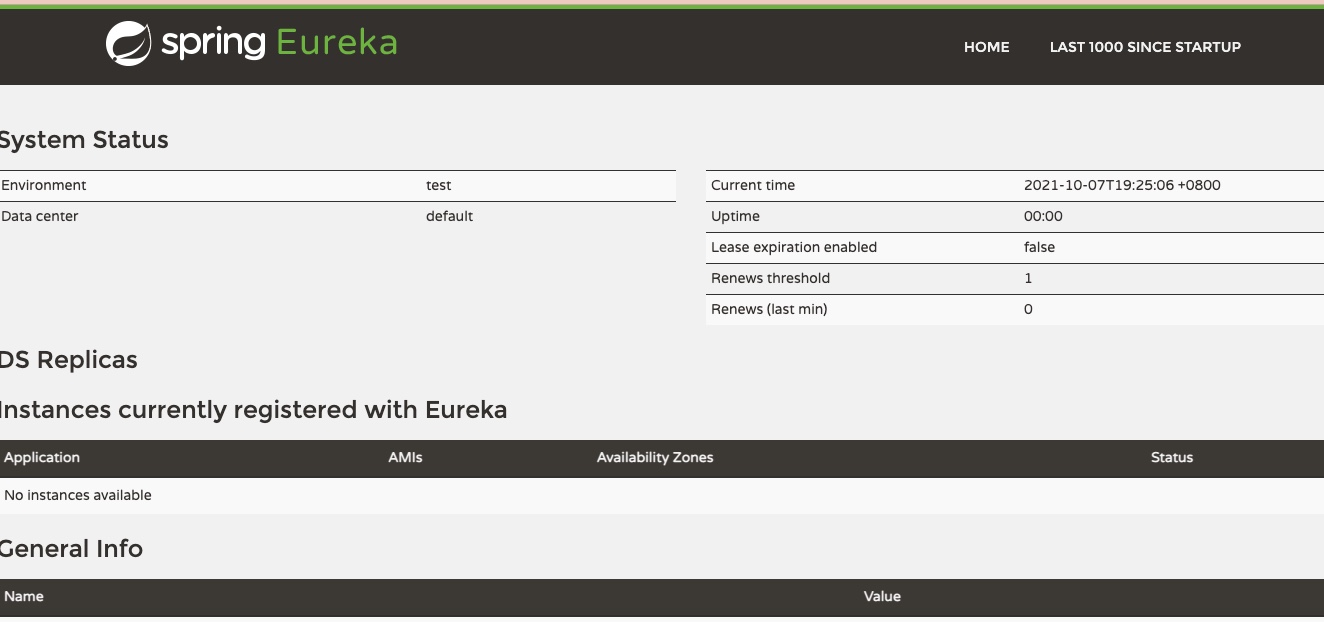
}
修改8001,pom的配置
追加
        <!--Eureka-->
        <!-- https://mvnrepository.com/artifact/org.springframework.cloud/spring-cloud-starter-eureka -->
        <dependency>
            <groupId>org.springframework.cloud</groupId>
            <artifactId>spring-cloud-starter-eureka</artifactId>
            <version>1.4.6.RELEASE</version>
        </dependency>
追加!!!applicaiton.yml
#最加Eureka配置,服务注册到哪里??
eureka:
  client:
    service-url:
      defaultZone: http://localhost:7001/eureka/
修改主启动类
头上
//启动类
@SpringBootApplication
@EnableEurekaClient //配置注解之后,启动后,自动注册到Eureka服务中心
public class DeptProvider_8001 {
    public static void main(String[] args) {

        SpringApplication.run(DeptProvider_8001.class,args);
    }
}
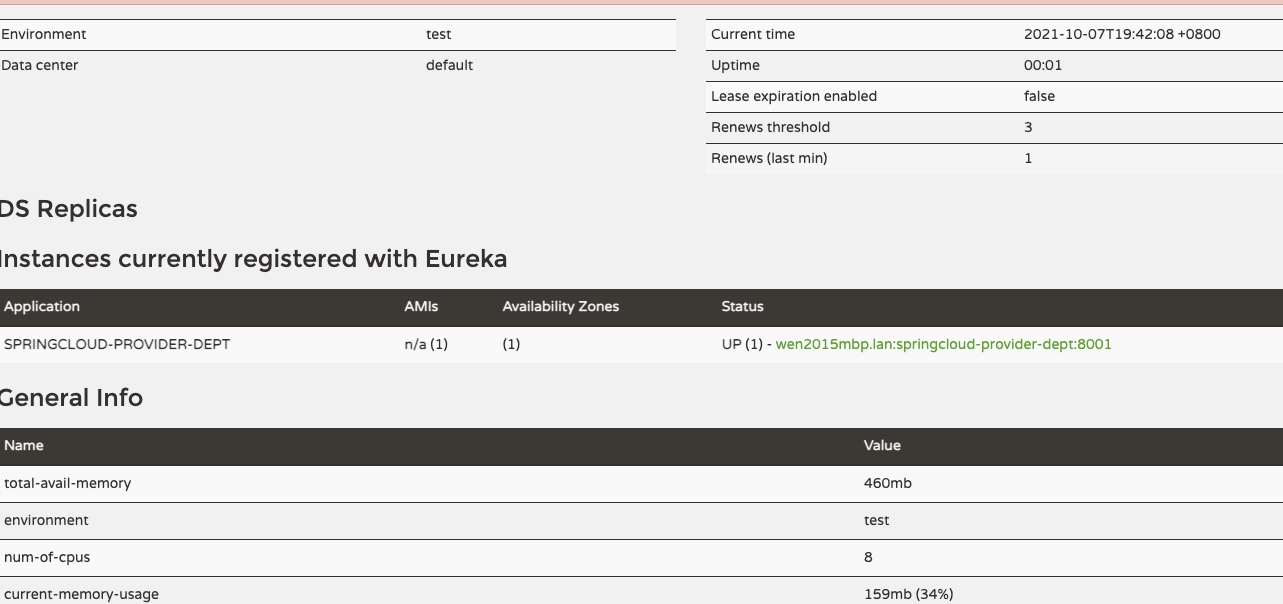
Spring Cloud Ribbon入门和实战
link->访问