Spring Batch 作为 Spring 的子项目,是一款基于 Spring 的企业批处理框架。通过它可以构建出健壮的企业批处理应用。Spring Batch 不仅提供了统一的读写接口、丰富的任务处理方式、灵活的事务管理及并发处理,同时还支持日志、监控、任务重启与跳过等特性,大大简化了批处理应用开发,将开发人员从复杂的任务配置管理过程中解放出来,使他们可以更多地去关注核心的业务处理过程。
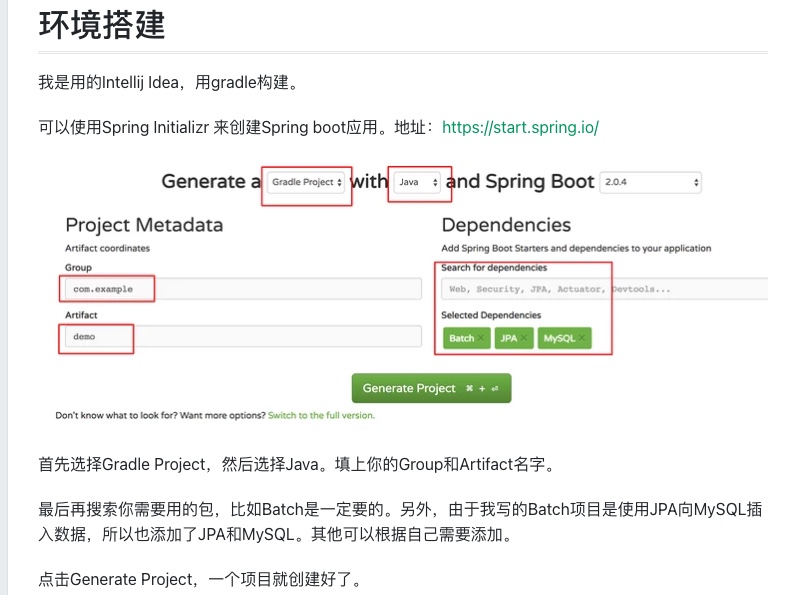
Build.gralde文件大概就长这个样子:
buildscript {
   ext {
      springBootVersion = '2.0.4.RELEASE'
   }
   repositories {
      mavenCentral()
   }
   dependencies {
      classpath("org.springframework.boot:spring-boot-gradle-plugin:${springBootVersion}")
   }
}

apply plugin: 'java'
apply plugin: 'idea'
apply plugin: 'org.springframework.boot'
apply plugin: 'io.spring.dependency-management'

group = 'com.demo'
version = '0.0.1-SNAPSHOT'
sourceCompatibility = 1.8

repositories {
   mavenCentral()
}

dependencies {
   compile('org.springframework.boot:spring-boot-starter-batch')
   compile('org.springframework.boot:spring-boot-starter-jdbc')
   compile("org.springframework.boot:spring-boot-starter-data-jpa")
   compile group: 'com.fasterxml.jackson.datatype', name: 'jackson-datatype-joda', version: '2.9.4'
   compile group: 'org.jadira.usertype', name: 'usertype.core', version: '6.0.1.GA'
   compile group: 'mysql', name: 'mysql-connector-java', version: '6.0.6',
   testCompile('org.springframework.boot:spring-boot-starter-test')
   testCompile('org.springframework.batch:spring-batch-test')
}
Spring Batch 结构
网上有很多Spring Batch结构和原理的讲解,我就不详细阐述了,我这里只讲一下Spring Batch的一个基本层级结构。
首先,Spring Batch运行的基本单位是一个Job,一个Job就做一件批处理的事情。
一个Job包含很多Step,step就是每个job要执行的单个步骤。
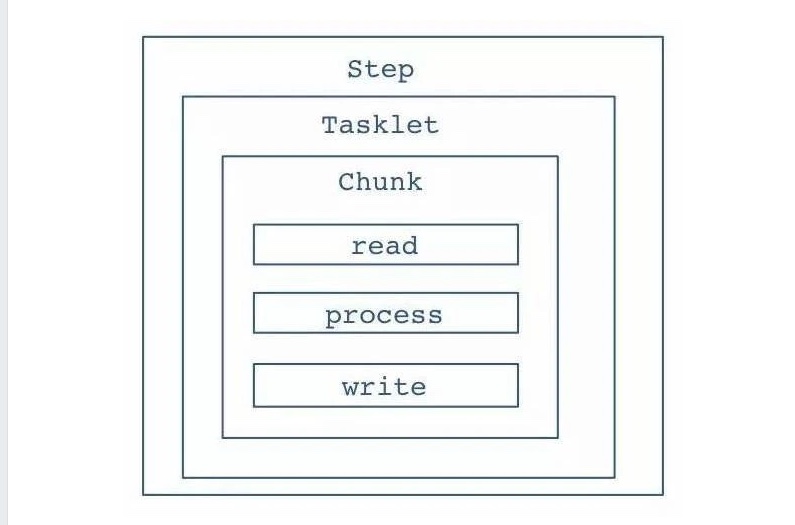
如下图所示,Step里面,会有Tasklet,Tasklet是一个任务单元,它是属于可以重复利用的东西。
然后是Chunk,chunk就是数据块,你需要定义多大的数据量是一个chunk。
Chunk里面就是不断循环的一个流程,读数据,处理数据,然后写数据。Spring Batch会不断的循环这个流程,直到批处理数据完成。
构建Spring Batch
首先,我们需要一个全局的Configuration来配置所有的Job和一些全局配置。
代码如下:
@Configuration
@EnableAutoConfiguration
@EnableBatchProcessing(modular = true)
public class SpringBatchConfiguration {
    @Bean
    public ApplicationContextFactory firstJobContext() {
        return new GenericApplicationContextFactory(FirstJobConfiguration.class);
    }

    @Bean
    public ApplicationContextFactory secondJobContext() {
        return new GenericApplicationContextFactory(SecondJobConfiguration.class);
    }

}
@EnableBatchProcessing是打开Batch。如果要实现多Job的情况,需要把EnableBatchProcessing注解的modular设置为true,让每个Job使用自己的ApplicationConext。
比如上面代码的就创建了两个Job。
例子背景
本博客的例子是迁移数据,数据源是一个文本文件,数据量是上百万条,一行就是一条数据。然后我们通过Spring Batch帮我们把文本文件的数据全部迁移到MySQL数据库对应的表里面。
假设我们迁移的数据是Message,那么我们就需要提前创建一个叫Message的和数据库映射的数据类。
@Entity
@Table(name = "message")
public class Message {
    @Id
    @Column(name = "object_id", nullable = false)
    private String objectId;

    @Column(name = "content")
    private String content;

    @Column(name = "last_modified_time")
    private LocalDateTime lastModifiedTime;

    @Column(name = "created_time")
    private LocalDateTime createdTime;
}
构建Job
首先我们需要一个关于这个Job的Configuration,它将在SpringBatchConfigration里面被加载。
@Configuration
@EnableAutoConfiguration
@EnableBatchProcessing(modular = true)
public class SpringBatchConfiguration {
    @Bean
    public ApplicationContextFactory messageMigrationJobContext() {
        return new GenericApplicationContextFactory(MessageMigrationJobConfiguration.class);
    }
}
下面的关于构建Job的代码都将写在这个MessageMigrationJobConfiguration里面。
`public class MessageMigrationJobConfiguration {
}
`
我们先定义一个Job的Bean。
@Autowired
private JobBuilderFactory jobBuilderFactory;

@Bean
public Job messageMigrationJob(@Qualifier("messageMigrationStep") Step messageMigrationStep) {
    return jobBuilderFactory.get("messageMigrationJob")
            .start(messageMigrationStep)
            .build();
}
jobBuilderFactory是注入进来的,get里面的就是job的名字。
这个job只有一个step。
Step
接下来就是创建Step。
@Autowired
private StepBuilderFactory stepBuilderFactory;

@Bean
public Step messageMigrationStep(@Qualifier("jsonMessageReader") FlatFileItemReader<Message> jsonMessageReader,
                                 @Qualifier("messageItemWriter") JpaItemWriter<Message> messageItemWriter,
                                 @Qualifier("errorWriter") Writer errorWriter) {
    return stepBuilderFactory.get("messageMigrationStep")
            .<Message, Message>chunk(CHUNK_SIZE)
            .reader(jsonMessageReader).faultTolerant().skip(JsonParseException.class).skipLimit(SKIP_LIMIT)
            .listener(new MessageItemReadListener(errorWriter))
            .writer(messageItemWriter).faultTolerant().skip(Exception.class).skipLimit(SKIP_LIMIT)
            .listener(new MessageWriteListener())
            .build();
}
stepBuilderFactory是注入进来的,然后get里面是Step的名字。
我们的Step中可以构建很多东西,比如reader,processer,writer,listener等等。
下面我们就逐个来看看step里面的这些东西是如何使用的。
Chunk
Spring batch在配置Step时采用的是基于Chunk的机制,即每次读取一条数据,再处理一条数据,累积到一定数量后再一次性交给writer进行写入操作。这样可以最大化的优化写入效率,整个事务也是基于Chunk来进行。
比如我们定义chunk size是50,那就意味着,spring batch处理了50条数据后,再统一向数据库写入。
这里有个很重要的点,chunk前面需要定义数据输入类型和输出类型,由于我们输入是Message,输出也是Message,所以两个都直接写Message了。
如果不定义这个类型,会报错。
.<Message, Message>chunk(CHUNK_SIZE)
Reader
Reader顾名思义就是从数据源读取数据。
Spring Batch给我们提供了很多好用实用的reader,基本能满足我们所有需求。比如FlatFileItemReader,JdbcCursorItemReader,JpaPagingItemReader等。也可以自己实现Reader。
本例子里面,数据源是文本文件,所以我们就使用FlatFileItemReader。FlatFileItemReader是从文件里面一行一行的读取数据。
首先需要设置文件路径,也就是设置resource。
因为我们需要把一行文本映射为Message类,所以我们需要自己设置并实现LineMapper。
@Bean
public FlatFileItemReader<Message> jsonMessageReader() {
    FlatFileItemReader<Message> reader = new FlatFileItemReader<>();
    reader.setResource(new FileSystemResource(new File(MESSAGE_FILE)));
    reader.setLineMapper(new MessageLineMapper());
    return reader;
}
Line Mapper
LineMapper的输入就是获取一行文本,和行号,然后转换成Message。
在本例子里面,一行文本就是一个json对象,所以我们使用JsonParser来转换成Message。
public class MessageLineMapper implements LineMapper<Message> {
    private MappingJsonFactory factory = new MappingJsonFactory();

    @Override
    public Message mapLine(String line, int lineNumber) throws Exception {
        JsonParser parser = factory.createParser(line);
        Map<String, Object> map = (Map) parser.readValueAs(Map.class);
        Message message = new Message();
        ... // 转换逻辑
        return message;
    }
}link:this