前端页面
<!DOCTYPE html>
<html lang="en">
<head>
    <meta charset="UTF-8">
    <title>学员调查问卷</title>
    <style>
        .container {
            position: absolute;
            border: 1px solid #cccccc;
            left: 50%;
            top: 50%;
            width: 400px;
            height: 300px;
            margin-left: -200px;
            margin-top: -150px;
            box-sizing: border-box;
            padding: 10px;
        }
        h2{
            margin: 10px 0px;
            text-align: center;
        }
        h3{
            margin: 10px  0px;
        }
    </style>
</head>
<body>
<div class="container">
    <h2>学员调查问卷</h2>
    <form action="./apply" method="post">
        <h3>您的姓名</h3>
        <input name="name" class="text"  style="width: 150px">
        <h3>您正在学习的技术方向</h3>
        <select name="course" style="width: 150px">
            <option value="java">Java</option>
            <option value="h5">HTML5</option>
            <option value="python">Python</option>
            <option value="php">PHP</option>
        </select>
        <div>
            <h3>您的学习目的:</h3>
            <input type="checkbox" name="purpose" value="1">就业找工作
            <input type="checkbox" name="purpose" value="2">工作要求
            <input type="checkbox" name="purpose" value="3">兴趣爱好
            <input type="checkbox" name="purpose" value="4">其他
        </div>
        <div style="text-align: center;padding-top:10px" >
            <input type="submit" value="提交" style="width:100px">
        </div>
    </form>

</div>
</body>
</html>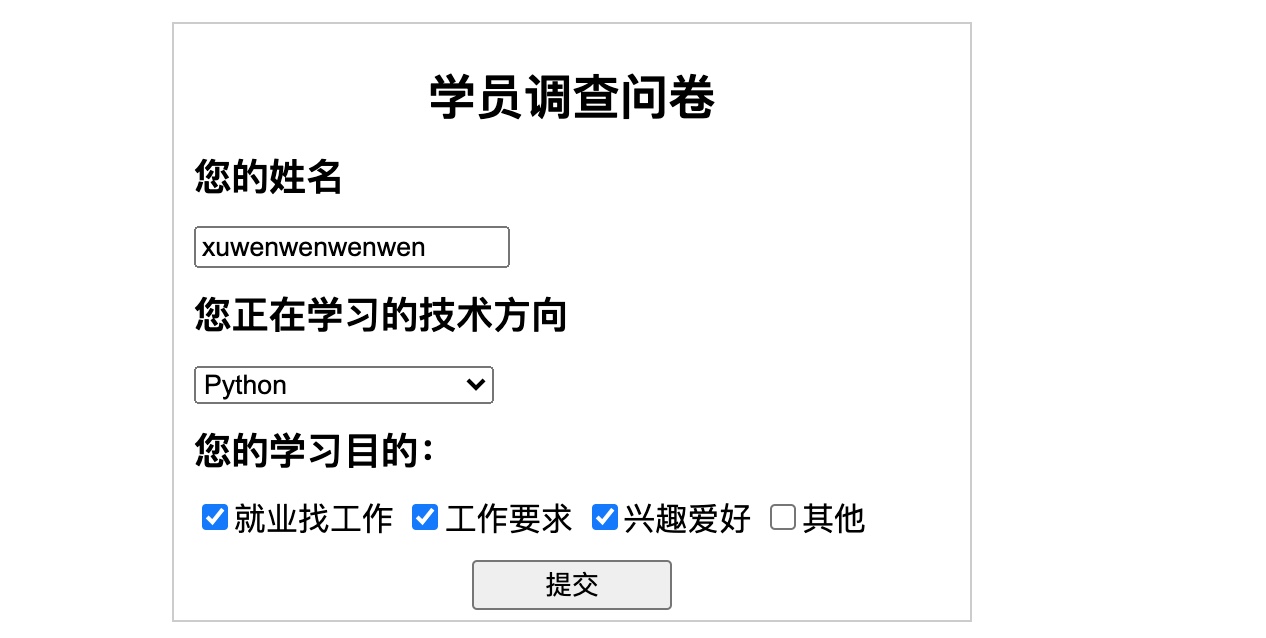
后端页面,controller
package com.imooc.springmvc.controller;

import org.springframework.stereotype.Controller;
import org.springframework.web.bind.annotation.PostMapping;
import org.springframework.web.bind.annotation.RequestParam;
import org.springframework.web.bind.annotation.ResponseBody;

import java.util.List;

@Controller
public class FromController {
//    方法一:数组的模式,但是使用很少了
//    @PostMapping("/apply")
//    @ResponseBody
//    public String apply(String name,String course,Integer[]purpose){
//        System.out.println(name);
//        System.out.println(course);
//        for(Integer p:purpose){
//            System.out.println(p);
//        }
//        return "SUCCESS!!...";
//    }

//    方法二:List集合
    @PostMapping("/apply")
    @ResponseBody
    public String apply(String name,String course,@RequestParam List<Integer> purpose){
        System.out.println(name);
        System.out.println(course);
        for(Integer p:purpose){
            System.out.println(p);
        }
        return "SUCCESS!!...";
    }
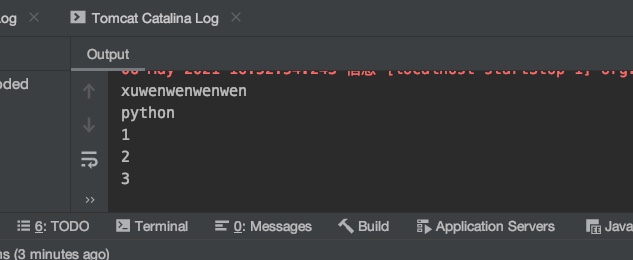
}
方法三,实体类entity,obj
main-java-com.imooc.springmvc.controller>新建一个entity包,新建一个From的class
package com.imooc.springmvc.entity;

import java.util.List;

public class Form {
    private String name;
    private String course;
    private List<Integer> purpose;

    public String getName() {
        return name;
    }

    public void setName(String name) {
        this.name = name;
    }

    public String getCourse() {
        return course;
    }

    public void setCourse(String course) {
        this.course = course;
    }

    public List<Integer> getPurpose() {
        return purpose;
    }

    public void setPurpose(List<Integer> purpose) {
        this.purpose = purpose;
    }
}
方法三
//    方法三:entity实体类,obj。
    @PostMapping("/apply")
    @ResponseBody
    public String apply(Form form){
        return "SUCCESS!!...";
    }
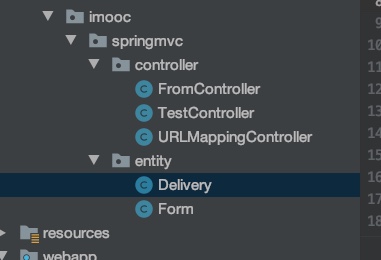
情况4:前端追加信息,比如追加收货地址,收货人,收货电话信息,后端如何操作??
前端
<!DOCTYPE html>
<html lang="en">
<head>
    <meta charset="UTF-8">
    <title>学员调查问卷</title>
    <style>
        .container {
            position: absolute;
            border: 1px solid #cccccc;
            left: 50%;
            top: 50%;
            width: 400px;
            height: 600px;
            margin-left: -200px;
            margin-top: -300px;
            box-sizing: border-box;
            padding: 10px;
        }
        h2{
            margin: 10px 0px;
            text-align: center;
        }
        h3{
            margin: 10px  0px;
        }
    </style>
</head>
<body>
<div class="container">
    <h2>学员调查问卷</h2>
    <form action="./apply" method="post">
        <h3>您的姓名</h3>
        <input name="name" class="text"  style="width: 150px">
        <h3>您正在学习的技术方向</h3>
        <select name="course" style="width: 150px">
            <option value="java">Java</option>
            <option value="h5">HTML5</option>
            <option value="python">Python</option>
            <option value="php">PHP</option>
        </select>
        <div>
            <h3>您的学习目的:</h3>
            <input type="checkbox" name="purpose" value="1">就业找工作
            <input type="checkbox" name="purpose" value="2">工作要求
            <input type="checkbox" name="purpose" value="3">兴趣爱好
            <input type="checkbox" name="purpose" value="4">其他
        </div>
        <h3>收货人</h3>
        <input name="delivery.name" class="text" style="width:150px">
        <h3>联系电话</h3>
        <input name="delivery.mobile" class="text" style="width:150px">
        <h3>收货地址</h3>
        <input name="delivery.address" class="text" style="width:150px">
        <div style="text-align: center;padding-top:10px" >
            <input type="submit" value="提交" style="width:100px">
        </div>
    </form>

</div>
</body>
</html>
追加Delivery类
对应前端的新增字段
package com.imooc.springmvc.entity;

public class Delivery {
    private String name;
    private String address;
    private String mobile;

    public String getName() {
        return name;
    }

    public void setName(String name) {
        this.name = name;
    }

    public String getAddress() {
        return address;
    }

    public void setAddress(String address) {
        this.address = address;
    }

    public String getMobile() {
        return mobile;
    }

    public void setMobile(String mobile) {
        this.mobile = mobile;
    }
}
form表单追加delivery的类,实例化+getter/setter方法
package com.imooc.springmvc.entity;

import java.util.List;

public class Form {
    private String name;
    private String course;
    private List<Integer> purpose;
//    追加的一个实体类,需要实例化+getter/setter
    private Delivery delivery = new Delivery();

    public String getName() {
        return name;
    }

    public void setName(String name) {
        this.name = name;
    }

    public String getCourse() {
        return course;
    }

    public void setCourse(String course) {
        this.course = course;
    }

    public List<Integer> getPurpose() {
        return purpose;
    }

    public void setPurpose(List<Integer> purpose) {
        this.purpose = purpose;
    }

    public Delivery getDelivery() {
        return delivery;
    }

    public void setDelivery(Delivery delivery) {
        this.delivery = delivery;
    }
}
最后,在FormController里面修改
package com.imooc.springmvc.controller;
import com.imooc.springmvc.entity.Form;
import org.springframework.stereotype.Controller;
import org.springframework.web.bind.annotation.PostMapping;
import org.springframework.web.bind.annotation.RequestParam;
import org.springframework.web.bind.annotation.ResponseBody;
@Controller
public class FromController {
    //追加关联对象类型,delivery
    @PostMapping("/apply")
    @ResponseBody
    public String applyDelivery(Form form){
        System.out.println(form.getDelivery().getName());
        return "SUCCESS。。。!!!";
    }
}